Go from one prompt to a running, published app in about 10 minutes.
About 10 minutesThis guide walks you through one full pass of Alpha: describe an app, watch the agent build it, change it by pointing at it, and publish it. You don’t write any code. If you’d rather understand the moving parts first, read How Alpha works.By the end of this guide you will have a booking page for a sailing school, live at its own https:// address.
Nothing to install. Every session gets its own machine in the cloud, so a browser is all you need.
No GitHub. This app lives in the session; you can connect GitHub later.
Keep API keys out of your messages. Anything you type in the composer lands in the transcript. Save keys as secrets instead, and the agent gets them as environment variables.
After you sign in, Alpha opens on the home screen: a greeting, the composer and a row of suggestion chips. There is no session yet. Your first message creates one.
The home screen, with the Harbor prompt typed and ready to send.
2
Describe the app
Paste this prompt into the composer and press Enter. It names an outcome and how to check it; Prompt Alpha well explains why that matters.Alpha will:
Start a fresh machine for the session, usually in about a second.
Write the app in the machine’s /workspace folder.
Start it on a port and check that booking works.
Open the Preview beside the chat.
3
Watch it work
Your message appears at once, with a status line under it: “Starting a fresh machine…”, then “Handing your prompt to the agent…”. A seconds counter appears after three seconds. Once the agent has your prompt, the line shows a working word such as “Striking while hot…”. What happens when you start a session covers each phase.
A few seconds in: the agent has your prompt, and the working line shows it's still going.
The agent’s commands, file edits and thoughts fold into one line with a tally. Click its chevron to see each one, as described in Follow the agent’s work. When the app serves a page, the Preview tab opens by itself.
4
Check it at phone width
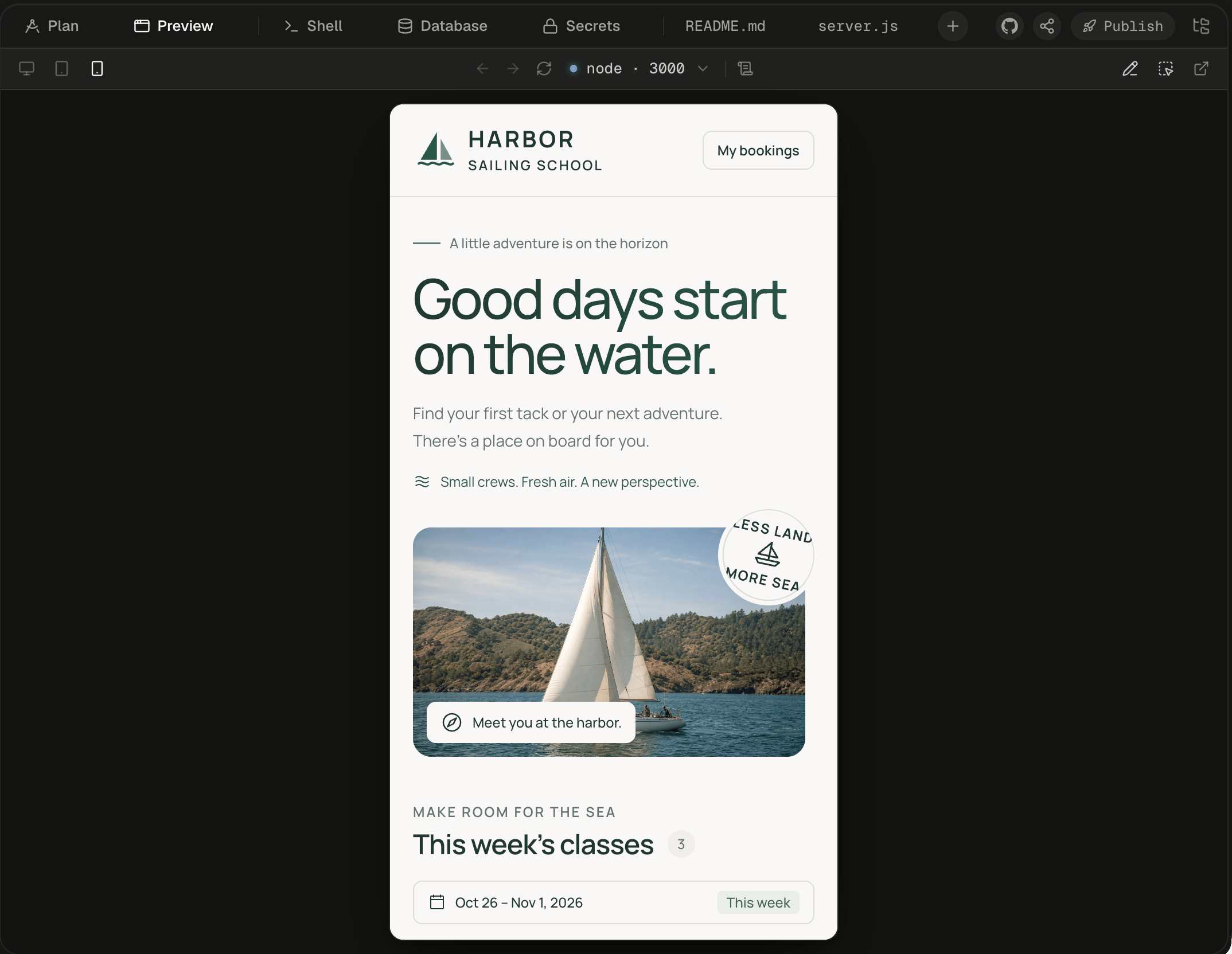
In the Preview toolbar, choose the phone icon, Mobile · 390px. The frame narrows in place. If the device switch is hidden, drag the divider to widen the workspace. Preview your app covers the rest of the toolbar.
Mobile narrows the frame, and the app's phone layout takes over.
5
Point at something to change
Click Select in the Preview toolbar, then click the description on the Beginner Dinghy card. The element becomes a chip in the composer, showing its tag and its first words, so the agent knows exactly which element you mean. Type Make this text larger on mobile and press Enter. Press Esc to cancel a pick. Point at and draw on your app shows the other ways to point.
The picked paragraph waits in the composer as a chip, above your request.
6
Send a follow-up while it works
While the agent works, Enterqueues your message: it runs as its own turn after the current one. ⌘ Enter (Ctrl on Windows and Linux) steers instead: the message joins the running turn without stopping it. Try queueing Show a "Full" label on classes with no seats left. To swap which key does which, open Account menu → Settings → New messages. Queue, steer or stop has the details.
7
Publish the app
Wait for the agent to finish, then click Publish at the right of the workspace tabs. The Publish to production popover shows what will go live: Serves, Database, Sign-in and Access. Click Publish, which sends “Deploy this.” to the agent.
The Publish to production popover, before anything is sent.
If you don’t see Publish beside Share, publishing isn’t turned on for your Alpha.
8
Name it and open the address
The agent asks for a name in a question card. Pick its suggestion or type your own, such as harbor-bookings. The name is the start of the app’s address, so it can’t be changed later. The Publish tab opens and follows the rollout through Export, Plan, Build, Publish and Live. This usually takes 2 to 6 minutes. When the version card shows Published, click Open on the Published URL card.
Your app is live. Anyone with the address can open it, and it keeps running when your session sleeps.
The work carries on. Turns run on Alpha’s servers, not in your browser, so the transcript is complete when you return. Once no Alpha tab of yours has been visible for about 30 minutes, a session with nothing running goes to sleep. Opening it wakes it with every file and process as you left them. Your published app runs outside the session’s machine, so it stays up either way. See Sleep, wake and reset.You have done the core Alpha loop: describe, watch, point, publish.
Keep Harbor’s bookings across restarts and let students sign in, then take both to production.
How Alpha works
Sessions, machines, turns and the workspace, and how they fit together.
The composer
Attach files, mention them with @, pick a model and use slash commands.
Publish your app
What can be published, the rules for names, and what to do when a build fails.
⌘I
{"docsConfig":{"theme":"maple","$schema":"https://mintlify.com/docs.json","name":"Alpha","colors":{"primary":"#1A54F0","light":"#749FF9","dark":"#1A54F0"},"logo":{"light":"https://mintcdn.com/lyzr-15a99e0f/peFm_Sv4KgaR4cun/images/logo/light.png?fit=max\u0026auto=format\u0026n=peFm_Sv4KgaR4cun\u0026q=85\u0026s=633788f52e3e9a8128bdaf2d7a62fff6","dark":"https://mintcdn.com/lyzr-15a99e0f/peFm_Sv4KgaR4cun/images/logo/dark.png?fit=max\u0026auto=format\u0026n=peFm_Sv4KgaR4cun\u0026q=85\u0026s=cca4899a3c056f427f80610ac85d1170","href":"https://alpha.new"},"favicon":"https://mintcdn.com/lyzr-15a99e0f/peFm_Sv4KgaR4cun/images/favicon.png?fit=max\u0026auto=format\u0026n=peFm_Sv4KgaR4cun\u0026q=85\u0026s=606bf8d8b1dd77e7fc7d13b52bd06f85","appearance":{"default":"system","strict":false},"background":{"color":{"light":"#FAFAF9","dark":"#0E0E0D"}},"navbar":{"primary":{"type":"button","label":"Open Alpha","href":"https://alpha.new"}},"footer":{"socials":{"github":"https://github.com/suyash-lyzr/alpha-documentation"}},"search":{"prompt":"Search docs"},"seo":{"metatags":{"og:site_name":"Alpha docs"}},"fonts":{"family":"Geist"},"icons":{"library":"fontawesome"},"styling":{"eyebrows":"section","codeblocks":"system","latex":false},"contextual":{"options":["copy","view","chatgpt","claude"],"display":"header"},"navigation":{"pages":[]}},"deployment":{"deploymentMetadataValue":{"subdomain":"lyzr-15a99e0f","hasAudioNarration":false,"actualSubdomain":"lyzr-15a99e0f","customDomains":[],"gitSource":{"type":"github","owner":"suyash-lyzr","repo":"alpha-documentation","deployBranch":"main","contentDirectory":"","isPrivate":false,"mountPath":"","label":"","_id":"6ae0b4f093d54c7ebe38e84c"},"chroma":{"latestBuiltDeploymentHistoryId":"6ae13e48963c9b68664e663c","collectionId":"6f6abaac-a319-483c-b30d-6356d4f82504","liveDeploymentHistoryId":"6ae13e48963c9b68664e663c","schemaVersion":"v3"},"entitlements":{"AI_CHAT":{"status":"ENABLED"},"WEB_MCP":{"status":"ENABLED"},"NARRATION":{"status":"ENABLED"}},"buildId":"6ae13f861208be8074bfe6ae","clientVersion":"0.0.3990","searchFilterCounts":[{"language":"default","tag":"Build","count":22},{"language":"default","tag":"Get started","count":17},{"language":"default","tag":"Reference","count":12},{"language":"default","tag":"Workspace","count":10},{"language":"default","tag":"Ship","count":8},{"language":"default","tag":"Agents","count":7},{"language":"default","tag":"Connect","count":7},{"language":"default","tag":"Chat with the agent","count":6},{"language":"default","tag":"Sessions","count":6},{"language":"default","tag":"Guides","count":5}]},"assistantConfig":{"enableAskAiButton":false,"enableStarterQuestions":false,"enableContextualStarterQuestions":false,"enableAskAiSearchBar":true},"basePath":"","hasChatPermissions":true,"hasWebMcpPermissions":true,"toggles":[{"name":"kill-isr","enabled":true,"variant":{"name":"disabled","enabled":false,"feature_enabled":true},"impressionData":false},{"name":"agent-mintlify-slack","enabled":true,"variant":{"name":"disabled","enabled":false,"feature_enabled":true},"impressionData":false},{"name":"editor-v7-file-tree","enabled":true,"variant":{"name":"disabled","enabled":false,"feature_enabled":true},"impressionData":false},{"name":"agent-integrations-settings","enabled":true,"variant":{"name":"disabled","enabled":false,"feature_enabled":true},"impressionData":false},{"name":"automations-pr-grouping","enabled":true,"variant":{"name":"disabled","enabled":false,"feature_enabled":true},"impressionData":false},{"name":"custom-prefix","enabled":true,"variant":{"name":"disabled","enabled":false,"feature_enabled":true},"impressionData":false},{"name":"analytics-v7","enabled":true,"variant":{"name":"disabled","enabled":false,"feature_enabled":true},"impressionData":false},{"name":"user-flows-analytics","enabled":true,"variant":{"name":"disabled","enabled":false,"feature_enabled":true},"impressionData":false},{"name":"no-publish-flow","enabled":true,"variant":{"name":"disabled","enabled":false,"feature_enabled":true},"impressionData":false},{"name":"workos-onboarding","enabled":true,"variant":{"name":"disabled","enabled":false,"feature_enabled":true},"impressionData":false},{"name":"llms-txt-v2","enabled":true,"variant":{"name":"disabled","enabled":false,"feature_enabled":true},"impressionData":false},{"name":"pause-universal-search-reconcile","enabled":true,"variant":{"name":"disabled","enabled":false,"feature_enabled":true},"impressionData":false},{"name":"snapshot-serving-live","enabled":true,"variant":{"name":"disabled","enabled":false,"feature_enabled":true},"impressionData":false},{"name":"stripTemperatureMiddleware","enabled":true,"variant":{"name":"disabled","enabled":false,"feature_enabled":true},"impressionData":false},{"name":"per-site-search-delta","enabled":true,"variant":{"name":"disabled","enabled":false,"feature_enabled":true},"impressionData":false},{"name":"support-platform-pylon-zendesk","enabled":true,"variant":{"name":"disabled","enabled":false,"feature_enabled":true},"impressionData":false},{"name":"snapshot-serving","enabled":true,"variant":{"name":"disabled","enabled":false,"feature_enabled":true},"impressionData":false},{"name":"instant-rollback","enabled":true,"variant":{"name":"disabled","enabled":false,"feature_enabled":true},"impressionData":false},{"name":"granular-notifications-server","enabled":true,"variant":{"name":"disabled","enabled":false,"feature_enabled":true},"impressionData":false},{"name":"granular-notifications","enabled":true,"variant":{"name":"disabled","enabled":false,"feature_enabled":true},"impressionData":false},{"name":"editor-private-page-search","enabled":true,"variant":{"name":"disabled","enabled":false,"feature_enabled":true},"impressionData":false},{"name":"automations-fable","enabled":true,"variant":{"name":"disabled","enabled":false,"feature_enabled":true},"impressionData":false},{"name":"fixed-ai-action-pricing","enabled":true,"variant":{"name":"disabled","enabled":false,"feature_enabled":true},"impressionData":false},{"name":"automation-resolve-merge-conflict","enabled":true,"variant":{"name":"disabled","enabled":false,"feature_enabled":true},"impressionData":false},{"name":"scoped-publishing","enabled":true,"variant":{"name":"disabled","enabled":false,"feature_enabled":true},"impressionData":false},{"name":"mintql","enabled":true,"variant":{"name":"disabled","enabled":false,"feature_enabled":true},"impressionData":false},{"name":"page-level-analytics","enabled":true,"variant":{"name":"disabled","enabled":false,"feature_enabled":true},"impressionData":false},{"name":"editor-version-history-v2","enabled":true,"variant":{"name":"disabled","enabled":false,"feature_enabled":true},"impressionData":false},{"name":"editor-nav-generations","enabled":true,"variant":{"name":"disabled","enabled":false,"feature_enabled":true},"impressionData":false},{"name":"billing-page-v2","enabled":true,"variant":{"name":"disabled","enabled":false,"feature_enabled":true},"impressionData":false},{"name":"workspace-projects","enabled":true,"variant":{"name":"disabled","enabled":false,"feature_enabled":true},"impressionData":false},{"name":"assistant-v5","enabled":true,"variant":{"name":"disabled","enabled":false,"feature_enabled":true},"impressionData":false},{"name":"byok-sep-25","enabled":true,"variant":{"name":"disabled","enabled":false,"feature_enabled":true},"impressionData":false},{"name":"fork-pr-previews","enabled":true,"variant":{"name":"disabled","enabled":false,"feature_enabled":true},"impressionData":false},{"name":"revalidation-jwt","enabled":true,"variant":{"name":"disabled","enabled":false,"feature_enabled":true},"impressionData":false},{"name":"vite-origin","enabled":true,"variant":{"name":"disabled","enabled":false,"feature_enabled":true},"impressionData":false},{"name":"editor-agent-model-picker","enabled":true,"variant":{"name":"disabled","enabled":false,"feature_enabled":true},"impressionData":false},{"name":"billing-updated-9-15","enabled":true,"variant":{"name":"disabled","enabled":false,"feature_enabled":true},"impressionData":false},{"name":"workos-sso-scim","enabled":true,"variant":{"name":"disabled","enabled":false,"feature_enabled":true},"impressionData":false},{"name":"hobby-abuse-scan","enabled":true,"variant":{"name":"disabled","enabled":false,"feature_enabled":true},"impressionData":false},{"name":"dashboard-inbox","enabled":true,"variant":{"name":"disabled","enabled":false,"feature_enabled":true},"impressionData":false},{"name":"workos-signup","enabled":true,"variant":{"name":"disabled","enabled":false,"feature_enabled":true},"impressionData":false},{"name":"workos-enabled","enabled":true,"variant":{"name":"disabled","enabled":false,"feature_enabled":true},"impressionData":false}],"isAtlas":false,"googleFontsInlined":true},"customCss":[{"filePath":"style.css","content":"/* cyrillic-ext */\n@font-face {\n font-family: 'Geist Mono';\n font-style: normal;\n font-weight: 400;\n font-display: swap;\n src: url(/_mintlify/assets/fonts/google/s/geistmono/v6/or3nQ6H-1_WfwkMZI_qYFrodmgPn.woff2) format('woff2');\n unicode-range: U+0460-052F, U+1C80-1C8A, U+20B4, U+2DE0-2DFF, U+A640-A69F, U+FE2E-FE2F;\n}\n/* cyrillic */\n@font-face {\n font-family: 'Geist Mono';\n font-style: normal;\n font-weight: 400;\n font-display: swap;\n src: url(/_mintlify/assets/fonts/google/s/geistmono/v6/or3nQ6H-1_WfwkMZI_qYFrMdmgPn.woff2) format('woff2');\n unicode-range: U+0301, U+0400-045F, U+0490-0491, U+04B0-04B1, U+2116;\n}\n/* symbols2 */\n@font-face {\n font-family: 'Geist Mono';\n font-style: normal;\n font-weight: 400;\n font-display: swap;\n src: url(/_mintlify/assets/fonts/google/s/geistmono/v6/or3nQ6H-1_WfwkMZI_qYFg08vz7ehw.woff2) format('woff2');\n unicode-range: U+2000-2001, U+2004-2008, U+200A, U+23B8-23BD, U+2500-259F;\n}\n/* vietnamese */\n@font-face {\n font-family: 'Geist Mono';\n font-style: normal;\n font-weight: 400;\n font-display: swap;\n src: url(/_mintlify/assets/fonts/google/s/geistmono/v6/or3nQ6H-1_WfwkMZI_qYFrgdmgPn.woff2) format('woff2');\n unicode-range: U+0102-0103, U+0110-0111, U+0128-0129, U+0168-0169, U+01A0-01A1, U+01AF-01B0, U+0300-0301, U+0303-0304, U+0308-0309, U+0323, U+0329, U+1EA0-1EF9, U+20AB;\n}\n/* latin-ext */\n@font-face {\n font-family: 'Geist Mono';\n font-style: normal;\n font-weight: 400;\n font-display: swap;\n src: url(/_mintlify/assets/fonts/google/s/geistmono/v6/or3nQ6H-1_WfwkMZI_qYFrkdmgPn.woff2) format('woff2');\n unicode-range: U+0100-02BA, U+02BD-02C5, U+02C7-02CC, U+02CE-02D7, U+02DD-02FF, U+0304, U+0308, U+0329, U+1D00-1DBF, U+1E00-1E9F, U+1EF2-1EFF, U+2020, U+20A0-20AB, U+20AD-20C4, U+2113, U+2C60-2C7F, U+A720-A7FF;\n}\n/* latin */\n@font-face {\n font-family: 'Geist Mono';\n font-style: normal;\n font-weight: 400;\n font-display: swap;\n src: url(/_mintlify/assets/fonts/google/s/geistmono/v6/or3nQ6H-1_WfwkMZI_qYFrcdmg.woff2) format('woff2');\n unicode-range: U+0000-00FF, U+0131, U+0152-0153, U+02BB-02BC, U+02C6, U+02DA, U+02DC, U+0304, U+0308, U+0329, U+2000-206F, U+20AC, U+2122, U+2191, U+2193, U+2212, U+2215, U+FEFF, U+FFFD;\n}\n/* cyrillic-ext */\n@font-face {\n font-family: 'Geist Mono';\n font-style: normal;\n font-weight: 500;\n font-display: swap;\n src: url(/_mintlify/assets/fonts/google/s/geistmono/v6/or3nQ6H-1_WfwkMZI_qYFrodmgPn.woff2) format('woff2');\n unicode-range: U+0460-052F, U+1C80-1C8A, U+20B4, U+2DE0-2DFF, U+A640-A69F, U+FE2E-FE2F;\n}\n/* cyrillic */\n@font-face {\n font-family: 'Geist Mono';\n font-style: normal;\n font-weight: 500;\n font-display: swap;\n src: url(/_mintlify/assets/fonts/google/s/geistmono/v6/or3nQ6H-1_WfwkMZI_qYFrMdmgPn.woff2) format('woff2');\n unicode-range: U+0301, U+0400-045F, U+0490-0491, U+04B0-04B1, U+2116;\n}\n/* symbols2 */\n@font-face {\n font-family: 'Geist Mono';\n font-style: normal;\n font-weight: 500;\n font-display: swap;\n src: url(/_mintlify/assets/fonts/google/s/geistmono/v6/or3nQ6H-1_WfwkMZI_qYFg08vz7ehw.woff2) format('woff2');\n unicode-range: U+2000-2001, U+2004-2008, U+200A, U+23B8-23BD, U+2500-259F;\n}\n/* vietnamese */\n@font-face {\n font-family: 'Geist Mono';\n font-style: normal;\n font-weight: 500;\n font-display: swap;\n src: url(/_mintlify/assets/fonts/google/s/geistmono/v6/or3nQ6H-1_WfwkMZI_qYFrgdmgPn.woff2) format('woff2');\n unicode-range: U+0102-0103, U+0110-0111, U+0128-0129, U+0168-0169, U+01A0-01A1, U+01AF-01B0, U+0300-0301, U+0303-0304, U+0308-0309, U+0323, U+0329, U+1EA0-1EF9, U+20AB;\n}\n/* latin-ext */\n@font-face {\n font-family: 'Geist Mono';\n font-style: normal;\n font-weight: 500;\n font-display: swap;\n src: url(/_mintlify/assets/fonts/google/s/geistmono/v6/or3nQ6H-1_WfwkMZI_qYFrkdmgPn.woff2) format('woff2');\n unicode-range: U+0100-02BA, U+02BD-02C5, U+02C7-02CC, U+02CE-02D7, U+02DD-02FF, U+0304, U+0308, U+0329, U+1D00-1DBF, U+1E00-1E9F, U+1EF2-1EFF, U+2020, U+20A0-20AB, U+20AD-20C4, U+2113, U+2C60-2C7F, U+A720-A7FF;\n}\n/* latin */\n@font-face {\n font-family: 'Geist Mono';\n font-style: normal;\n font-weight: 500;\n font-display: swap;\n src: url(/_mintlify/assets/fonts/google/s/geistmono/v6/or3nQ6H-1_WfwkMZI_qYFrcdmg.woff2) format('woff2');\n unicode-range: U+0000-00FF, U+0131, U+0152-0153, U+02BB-02BC, U+02C6, U+02DA, U+02DC, U+0304, U+0308, U+0329, U+2000-206F, U+20AC, U+2122, U+2191, U+2193, U+2212, U+2215, U+FEFF, U+FFFD;\n}\n:root{--a-canvas:#f0f0ef;--a-bg:#fafaf9;--a-card:#ffffff;--a-fill:#f2f2f1;--a-fg:#161614;--a-soft:#3c3c39;--a-muted:#636361;--a-border:rgb(22 22 20 / 9%);--a-signal:#1a54f0;--a-signal-soft:rgb(26 84 240 / 8%);--a-radius:0.7rem;--a-shadow-card:0 0 0 1px var(--a-border), 0 1px 2px rgb(22 22 20 / 4%), 0 2px 6px rgb(22 22 20 / 4%);--a-shadow-raised:0 0 0 1px var(--a-border), 0 2px 10px rgb(22 22 20 / 7%)}.dark{--a-canvas:#0e0e0d;--a-bg:#0e0e0d;--a-card:#181817;--a-fill:#20201f;--a-fg:#f5f5f4;--a-soft:#d6d6d3;--a-muted:#9f9f9a;--a-border:rgb(255 255 255 / 8%);--a-signal:#749ff9;--a-signal-soft:rgb(116 159 249 / 10%);--a-shadow-card:0 0 0 1px var(--a-border), inset 0 1px 0 rgb(255 255 255 / 4%), 0 1px 2px rgb(0 0 0 / 25%);--a-shadow-raised:0 0 0 1px var(--a-border), inset 0 1px 0 rgb(255 255 255 / 5%), 0 2px 12px rgb(0 0 0 / 30%)}code,kbd,pre{font-family:\"Geist Mono\",ui-monospace,\"SF Mono\",Menlo,monospace!important}#page-title{font-size:1.75rem!important;line-height:1.2!important;font-weight:600!important;letter-spacing:-.025em!important}#header .eyebrow{font-size:.75rem;font-weight:500;letter-spacing:.01em}#content-area .prose{font-size:.9375rem;line-height:1.7}#content-area .prose h2{font-size:1.25rem;font-weight:600;letter-spacing:-.015em;margin-top:2.5rem}#content-area .prose h3{font-size:1rem;font-weight:600;letter-spacing:-.01em}#content-area .prose li,#content-area .prose p{color:var(--a-soft)}#content-area .prose strong{color:var(--a-fg);font-weight:560}#content-area .prose a{text-decoration-color:color-mix(in oklab,var(--a-signal) 45%,transparent);text-underline-offset:3px}::selection{background:var(--a-signal-soft)}#sidebar-content{font-size:.875rem}#content-area .prose table,#table-of-contents{font-size:.8125rem}.callout,.card{border-radius:var(--a-radius)!important;box-shadow:var(--a-shadow-card)}.card{border-color:transparent!important;background:var(--a-card);transition:box-shadow 150ms ease}.card[role=link]:hover,a.card:hover{box-shadow:0 0 0 1px color-mix(in oklab,var(--a-signal) 55%,transparent),0 2px 10px rgb(22 22 20/6%)}.card [data-component-part=card-content-container]{display:flex;align-items:flex-start;gap:.75rem;padding:.875rem 1rem!important}.card [data-component-part=card-icon]{flex:none;width:1.75rem!important;height:1.75rem!important;margin:0!important;display:grid;place-items:center;border-radius:.45rem;background:var(--a-fill);box-shadow:0 0 0 1px var(--a-border)}.card [data-component-part=card-icon] svg{width:.875rem!important;height:.875rem!important;background-color:var(--a-soft)!important}.card [data-component-part=card-title],.card [data-component-part=card-title] *{margin-top:0!important;padding-top:.25rem;font-size:.875rem!important;line-height:1.3!important;font-weight:600;letter-spacing:-.01em}.card [data-component-part=card-content]{margin-top:0!important;font-size:.8125rem!important;line-height:1.5!important;color:var(--a-muted)}.card [data-component-part=card-content] *{font-size:inherit!important;line-height:inherit!important}.callout{border:0!important;background:var(--a-card)!important;font-size:.875rem}.callout [data-component-part=callout-icon] svg{color:var(--a-muted)!important}.callout[data-callout-type=warning] [data-component-part=callout-icon] svg{color:#c27c0e!important}.callout[data-callout-type=check] [data-component-part=callout-icon] svg{color:#1f8a5b!important}.callout [data-component-part=callout-content],.callout [data-component-part=callout-content] p{color:var(--a-soft)!important}[data-component-part=frame]{border-radius:calc(var(--a-radius)*1.4)!important;background:var(--a-fill)!important;border:0!important;box-shadow:0 0 0 1px var(--a-border);padding:.5rem!important}[data-component-part=frame] img,[data-component-part=frame] video{border-radius:var(--a-radius)!important;box-shadow:var(--a-shadow-raised)}[data-component-part=frame-caption]{font-size:.8125rem;color:var(--a-muted)}[data-component-part=step-number]{font-family:\"Geist Mono\",ui-monospace,monospace;font-size:.75rem!important}[data-component-part=step-title]{font-weight:600;letter-spacing:-.01em}#content-area .prose th{font-weight:560;color:var(--a-muted)}.prose :not(pre)>code{font-size:.8125rem;border-radius:.35rem}kbd{display:inline-block;min-width:1.4em;padding:.05em .4em;font-size:.75rem;line-height:1.5;text-align:center;color:var(--a-fg);background:var(--a-card);border-radius:.35rem;box-shadow:0 0 0 1px var(--a-border),0 1px 0 var(--a-border)}.prompt-card{margin:1.5rem 0;padding:.25rem .75rem .5rem;border-radius:calc(var(--a-radius)*1.4);background:var(--a-fill);box-shadow:0 0 0 1px var(--a-border)}.prompt-card-label{margin:.6rem .25rem -.25rem;font-size:.75rem;font-weight:500;color:var(--a-muted)}@media (max-width:640px){#page-title{font-size:1.5rem!important}#content-area .prose table{display:block;overflow-x:auto}}#content-area .prose table{width:100%;table-layout:fixed}#content-area .prose td,#content-area .prose th{overflow-wrap:anywhere;vertical-align:top}#alpha-top-actions{position:fixed;top:.5rem;right:1.5rem;z-index:40;display:flex;align-items:center;gap:1rem}#alpha-top-actions[hidden]{display:none}#alpha-changelog-link{font-size:.8125rem;font-weight:500;color:var(--a-muted);text-decoration:none;transition:color 150ms ease}#alpha-changelog-link:hover{color:var(--a-fg)}#alpha-ask-ai{display:inline-flex;align-items:center;gap:.4rem;height:2rem;padding:0 .5rem 0 .75rem;border-radius:999px;font-size:.8125rem;font-weight:560;color:var(--a-signal);background:var(--a-signal-soft);box-shadow:0 0 0 1px color-mix(in oklab,var(--a-signal) 35%,transparent);cursor:pointer;transition:background 150ms ease,box-shadow 150ms ease}#alpha-ask-ai:hover{background:color-mix(in oklab,var(--a-signal) 18%,transparent);box-shadow:0 0 0 1px color-mix(in oklab,var(--a-signal) 60%,transparent)}#alpha-ask-ai[hidden]{display:none}#alpha-ask-ai kbd{padding:0 .35em;font-size:.6875rem;color:inherit;background:0 0;box-shadow:0 0 0 1px color-mix(in oklab,var(--a-signal) 30%,transparent)}@media (max-width:1023px){#alpha-top-actions{display:none}}.card-group:is([style*=\"--cols:3\"], [style*=\"--cols: 3\"], [style*=\"--cols:4\"], [style*=\"--cols: 4\"]) .card [data-component-part=card-content-container]{display:block;padding:1rem!important}.card-group:is([style*=\"--cols:3\"], [style*=\"--cols: 3\"], [style*=\"--cols:4\"], [style*=\"--cols: 4\"]) .card [data-component-part=card-icon]{margin-bottom:.75rem!important}.card-group:is([style*=\"--cols:3\"], [style*=\"--cols: 3\"], [style*=\"--cols:4\"], [style*=\"--cols: 4\"]) .card [data-component-part=card-title]{padding-top:0}.card-group:is([style*=\"--cols:3\"], [style*=\"--cols: 3\"], [style*=\"--cols:4\"], [style*=\"--cols: 4\"]) .card [data-component-part=card-content]{margin-top:.25rem!important}:root{--content-width:46rem}html.alpha-sidebar-collapsed{--sidebar-width:0px;--content-width:54rem}html.alpha-sidebar-collapsed #sidebar{display:none!important}#alpha-sidebar-toggle{position:fixed;top:.6875rem;left:calc(var(--sidebar-width, 19rem) + .5rem);z-index:40;display:grid;place-items:center;width:1.625rem;height:1.625rem;border-radius:.45rem;color:var(--a-muted);cursor:pointer;transition:color 150ms ease,background 150ms ease}#alpha-sidebar-toggle:hover{color:var(--a-fg);background:var(--a-fill)}html.alpha-sidebar-collapsed #alpha-sidebar-toggle{color:var(--a-signal)}@media (max-width:1023px){#alpha-sidebar-toggle{display:none}}.update-container{flex-direction:column!important;gap:1rem!important}.update-container>div:first-child{position:static!important;width:100%!important;display:flex!important;flex-direction:row!important;flex-wrap:wrap;align-items:center!important;gap:.5rem;padding-bottom:1rem;border-bottom:1px solid var(--a-border)}.update-container [data-component-part=update-description]{order:-1;flex-basis:100%;max-width:none!important;margin:0 0 .125rem!important;font-size:1.25rem!important;line-height:1.3!important;font-weight:600!important;letter-spacing:-.015em;color:var(--a-fg)!important}.update-container [data-component-part=update-label]{padding:0!important;background:0 0!important;font-size:.8125rem!important;font-weight:500!important;color:var(--a-muted)!important}.update-container [data-component-part=update-label]::after{content:\"·\";margin-left:.5rem;color:var(--a-muted)}.update-container [data-component-part=update-tag-list]{display:flex;flex-wrap:wrap;gap:.375rem;margin:0!important}.update-container [data-component-part=update-tag]{margin:0!important;padding:.0625rem .5rem!important;border-radius:999px;font-size:.75rem!important;font-weight:500!important;line-height:1.5!important;color:var(--a-soft)!important;background:var(--a-fill)!important;box-shadow:0 0 0 1px var(--a-border)}.update-container [data-component-part=update-content]{width:100%}.update-container [data-component-part=update-content],.update-container [data-component-part=update-description]{padding-left:0!important;padding-right:0!important}.update-container [data-component-part=update-content]>:first-child{margin-left:0!important}#pagination [data-component-part=pagination-next]>div{justify-content:space-between!important}#pagination [data-component-part=pagination-next]>div>div:first-child{flex:1;align-items:flex-start!important;gap:.125rem}#pagination [data-component-part=pagination-description],#pagination [data-component-part=pagination-title]{width:100%!important;max-width:none!important;text-align:left!important}#pagination [data-component-part=pagination-description]{font-size:.8125rem}"}],"page":{"pagePath":"quickstart","slug":"/quickstart","pageMetadata":{"title":"Build your first app","sidebarTitle":"Quickstart","description":"Go from one prompt to a running, published app in about 10 minutes.","href":"/quickstart"},"description":{"compiledSource":"\"use strict\";\nconst {jsx: _jsx} = arguments[0];\nconst {useMDXComponents: _provideComponents} = arguments[0];\nfunction _createMdxContent(props) {\n const _components = {\n p: \"p\",\n ..._provideComponents(),\n ...props.components\n };\n return _jsx(_components.p, {\n children: \"Go from one prompt to a running, published app in about 10 minutes.\"\n });\n}\nfunction MDXContent(props = {}) {\n const {wrapper: MDXLayout} = {\n ..._provideComponents(),\n ...props.components\n };\n return MDXLayout ? _jsx(MDXLayout, {\n ...props,\n children: _jsx(_createMdxContent, {\n ...props\n })\n }) : _createMdxContent(props);\n}\nreturn {\n default: MDXContent\n};\n","frontmatter":{},"scope":{}},"pageType":"default","mdx":{"mdxSource":{"compiledSource":"\"use strict\";const{Fragment:_Fragment,jsx:_jsx,jsxs:_jsxs}=arguments[0];const{useMDXComponents:_provideComponents}=arguments[0];const PromptCard=({label=`Prompt`,children})=>_jsxs(`div`,{className:`prompt-card not-prose`,children:[_jsx(`div`,{className:`prompt-card-label`,children:label}),children]});const idlePark=`about 30 minutes`;const appUrl=`https://alpha.new`;function _createMdxContent(props){const _components={a:`a`,code:`code`,li:`li`,ol:`ol`,p:`p`,pre:`pre`,span:`span`,strong:`strong`,ul:`ul`,..._provideComponents(),...props.components},{Badge,Card,CardGroup,Check,CodeBlock,Frame,Heading,Note,OptimizedImage,Step,Steps,Warning,_MdxComponentBoundary}=_components;if(!Badge)_missingMdxReference(`Badge`,true);if(!Card)_missingMdxReference(`Card`,true);if(!CardGroup)_missingMdxReference(`CardGroup`,true);if(!Check)_missingMdxReference(`Check`,true);if(!CodeBlock)_missingMdxReference(`CodeBlock`,true);if(!Frame)_missingMdxReference(`Frame`,true);if(!Heading)_missingMdxReference(`Heading`,true);if(!Note)_missingMdxReference(`Note`,true);if(!OptimizedImage)_missingMdxReference(`OptimizedImage`,true);if(!Step)_missingMdxReference(`Step`,true);if(!Steps)_missingMdxReference(`Steps`,true);if(!Warning)_missingMdxReference(`Warning`,true);if(!_MdxComponentBoundary)_missingMdxReference(`_MdxComponentBoundary`,true);return _jsxs(_Fragment,{children:[_jsx(Badge,{children:`About 10 minutes`}),`\n`,_jsxs(_components.p,{children:[`This guide walks you through one full pass of Alpha: describe an app, watch the agent build it, change it by pointing at it, and publish it. You don’t write any code. If you’d rather understand the moving parts first, read `,_jsx(_components.a,{href:`/get-started/how-alpha-works`,children:`How Alpha works`}),`.`]}),`\n`,_jsxs(_components.p,{children:[`By the end of this guide you will have a booking page for a sailing school, live at its own `,_jsx(_components.code,{children:`https://`}),` address.`]}),`\n`,_jsx(Heading,{level:`2`,id:`before-you-start`,children:`Before you start`}),`\n`,_jsxs(_components.ul,{children:[`\n`,_jsxs(_components.li,{children:[`An Alpha account. Open `,_jsx(_components.a,{href:appUrl,children:appUrl}),` and sign in, or see `,_jsx(_components.a,{href:`/account/your-account`,children:`Your account`}),`.`]}),`\n`,_jsx(_components.li,{children:`Nothing to install. Every session gets its own machine in the cloud, so a browser is all you need.`}),`\n`,_jsxs(_components.li,{children:[`No GitHub. This app lives in the session; you can `,_jsx(_components.a,{href:`/github/connect`,children:`connect GitHub`}),` later.`]}),`\n`]}),`\n`,_jsx(Warning,{children:_jsxs(_components.p,{children:[`Keep API keys out of your messages. Anything you type in the composer lands in the transcript. Save keys as `,_jsx(_components.a,{href:`/secrets`,children:`secrets`}),` instead, and the agent gets them as environment variables.`]})}),`\n`,_jsx(Heading,{level:`2`,id:`build-and-publish-the-app`,children:`Build and publish the app`}),`\n`,_jsxs(Steps,{children:[_jsxs(Step,{title:`Sign in and open the home screen`,children:[_jsxs(_components.p,{children:[`After you sign in, Alpha opens on the `,_jsx(_components.a,{href:`/sessions/home-screen`,children:`home screen`}),`: a greeting, the composer and a row of suggestion chips. There is no session yet. Your first message creates one.`]}),_jsx(Frame,{caption:`The home screen, with the Harbor prompt typed and ready to send.`,children:_jsx(OptimizedImage,{src:`https://mintcdn.com/lyzr-15a99e0f/ObBpayiae_4aNgzN/images/get-started/quickstart-01-home.png?fit=max\u0026auto=format\u0026n=ObBpayiae_4aNgzN\u0026q=85\u0026s=7427da05ba33b78cd6ac96d9a4e1a187`,alt:`The Alpha home screen with the sidebar collapsed to a menu button at the top left. The Alpha by Lyzr lockup sits above the greeting Still up, Alex? Same. What are we building?, its second half in a blue-to-pink gradient, with a glowing horizon curving behind the composer. The composer holds the Harbor prompt, which starts Build a class-booking web app for Harbor Sailing School. Its bottom row shows, from the left, the paperclip, the agent chip reading codex, the model chip reading gpt-6.1-sol · high and the plan chip, then the setup chip reading blank machine, the repos chip, the microphone and the white round send button. Below the composer are seven suggestion chips: Apps, Agents, Decks \u0026 docs, Images \u0026 video, Data, Automations and Research.`,\"data-og-width\":`2940`,width:`2940`,\"data-og-height\":`1646`,height:`1646`,\"data-path\":`images/get-started/quickstart-01-home.png`,\"data-optimize\":`true`,\"data-opv\":`3`,srcset:`https://mintcdn.com/lyzr-15a99e0f/ObBpayiae_4aNgzN/images/get-started/quickstart-01-home.png?w=280\u0026fit=max\u0026auto=format\u0026n=ObBpayiae_4aNgzN\u0026q=85\u0026s=adf44f2a2aab032c9b55af1970016cab 280w, https://mintcdn.com/lyzr-15a99e0f/ObBpayiae_4aNgzN/images/get-started/quickstart-01-home.png?w=560\u0026fit=max\u0026auto=format\u0026n=ObBpayiae_4aNgzN\u0026q=85\u0026s=4dffa4565e06875781750203e1161403 560w, https://mintcdn.com/lyzr-15a99e0f/ObBpayiae_4aNgzN/images/get-started/quickstart-01-home.png?w=840\u0026fit=max\u0026auto=format\u0026n=ObBpayiae_4aNgzN\u0026q=85\u0026s=aa0b511e7276d0be6aebac26d528d141 840w, https://mintcdn.com/lyzr-15a99e0f/ObBpayiae_4aNgzN/images/get-started/quickstart-01-home.png?w=1100\u0026fit=max\u0026auto=format\u0026n=ObBpayiae_4aNgzN\u0026q=85\u0026s=675dd164d18ebfe4c4abee95e6ec6ecf 1100w, https://mintcdn.com/lyzr-15a99e0f/ObBpayiae_4aNgzN/images/get-started/quickstart-01-home.png?w=1650\u0026fit=max\u0026auto=format\u0026n=ObBpayiae_4aNgzN\u0026q=85\u0026s=31c7d16ce299230cf09d3ae199d5c37b 1650w, https://mintcdn.com/lyzr-15a99e0f/ObBpayiae_4aNgzN/images/get-started/quickstart-01-home.png?w=2500\u0026fit=max\u0026auto=format\u0026n=ObBpayiae_4aNgzN\u0026q=85\u0026s=b0133b40ac8590970fcf42a28b9815c0 2500w`})})]}),_jsxs(Step,{title:`Describe the app`,children:[_jsxs(_components.p,{children:[`Paste this prompt into the composer and press `,_jsx(`kbd`,{children:`Enter`}),`. It names an outcome and how to check it; `,_jsx(_components.a,{href:`/get-started/prompting`,children:`Prompt Alpha well`}),` explains why that matters.`]}),_jsx(_MdxComponentBoundary,{name:`PromptCard`,children:_jsx(PromptCard,{label:`Try this`,children:_jsx(CodeBlock,{filename:``,numberOfLines:`6`,language:`text`,children:_jsx(_components.pre,{className:`shiki shiki-themes github-light-default dark-plus`,style:{backgroundColor:`#ffffff`,\"--shiki-dark-bg\":`#0B0C0E`,color:`#1f2328`,\"--shiki-dark\":`#D4D4D4`},language:`text`,children:_jsxs(_components.code,{language:`text`,numberOfLines:`6`,children:[_jsx(_components.span,{className:`line`,children:_jsx(_components.span,{children:`Build a class-booking web app for Harbor Sailing School.`})}),`\n`,_jsx(_components.span,{className:`line`,children:_jsx(_components.span,{children:`Show this week's classes (Beginner Dinghy, Intermediate Keelboat, Sunset Sail) as cards with the day, time, instructor and seats left, each with a Book button.`})}),`\n`,_jsx(_components.span,{className:`line`,children:_jsx(_components.span,{children:`Booking asks for a name and email, takes one seat and shows a confirmation.`})}),`\n`,_jsx(_components.span,{className:`line`,children:_jsx(_components.span,{children:`Keep the data in memory for now.`})}),`\n`,_jsx(_components.span,{className:`line`,children:_jsx(_components.span,{children:`When it works, start it so I can see it in the Preview, and check that booking a class lowers its seats-left count.`})}),`\n`,_jsx(_components.span,{className:`line`,children:_jsx(_components.span,{})})]})})})})}),_jsx(_components.p,{children:`Alpha will:`}),_jsxs(_components.ol,{children:[`\n`,_jsx(_components.li,{children:`Start a fresh machine for the session, usually in about a second.`}),`\n`,_jsxs(_components.li,{children:[`Write the app in the machine’s `,_jsx(_components.code,{children:`/workspace`}),` folder.`]}),`\n`,_jsx(_components.li,{children:`Start it on a port and check that booking works.`}),`\n`,_jsx(_components.li,{children:`Open the Preview beside the chat.`}),`\n`]})]}),_jsxs(Step,{title:`Watch it work`,children:[_jsxs(_components.p,{children:[`Your message appears at once, with a status line under it: “Starting a fresh machine…”, then “Handing your prompt to the agent…”. A seconds counter appears after three seconds. Once the agent has your prompt, the line shows a working word such as “Striking while hot…”. `,_jsx(_components.a,{href:`/sessions/start-a-session`,children:`What happens when you start a session`}),` covers each phase.`]}),_jsx(Frame,{caption:`A few seconds in: the agent has your prompt, and the working line shows it's still going.`,children:_jsx(OptimizedImage,{src:`https://mintcdn.com/lyzr-15a99e0f/ObBpayiae_4aNgzN/images/get-started/quickstart-02-starting.png?fit=max\u0026auto=format\u0026n=ObBpayiae_4aNgzN\u0026q=85\u0026s=5d1641fc4cc55c27eca439e829624425`,alt:`A new session a few seconds after its first message, with the sidebar collapsed. The header shows the title Harbor Sailing Classes and a pill with the Codex mark reading codex, and at its right the round +, GitHub and Share buttons and the lit files button. There is no workspace panel. The files panel is open along the right edge, headed /workspace with Refresh and Hide buttons, and reads workspace is empty. At the top of the chat, the prompt asking for a class-booking web app for Harbor Sailing School sits in a bubble. Below it, the agent's first message reads I'll build the weekly class list and booking form, keep availability in server memory, and check that a booking reduces the seat count. I'm using the design-system and landing-page-design skills for the interface. Under it, a folded row with two small round icons reads 3 commands, and a three-by-three pixel loader sits beside Striking while hot… and a 4s counter. The composer at the bottom shows the placeholder Add a follow-up, the + button, the model chip reading gpt-6.1-sol · high, the plan chip, the microphone and a round Stop button with a dark square.`,\"data-og-width\":`2940`,width:`2940`,\"data-og-height\":`1533`,height:`1533`,\"data-path\":`images/get-started/quickstart-02-starting.png`,\"data-optimize\":`true`,\"data-opv\":`3`,srcset:`https://mintcdn.com/lyzr-15a99e0f/ObBpayiae_4aNgzN/images/get-started/quickstart-02-starting.png?w=280\u0026fit=max\u0026auto=format\u0026n=ObBpayiae_4aNgzN\u0026q=85\u0026s=9e692b8aa13425f4f1d4fd4852d46023 280w, https://mintcdn.com/lyzr-15a99e0f/ObBpayiae_4aNgzN/images/get-started/quickstart-02-starting.png?w=560\u0026fit=max\u0026auto=format\u0026n=ObBpayiae_4aNgzN\u0026q=85\u0026s=17773807c4b8ebb83908eb29d7761689 560w, https://mintcdn.com/lyzr-15a99e0f/ObBpayiae_4aNgzN/images/get-started/quickstart-02-starting.png?w=840\u0026fit=max\u0026auto=format\u0026n=ObBpayiae_4aNgzN\u0026q=85\u0026s=40c8ca12b39613968ce98be0f2bdf9d0 840w, https://mintcdn.com/lyzr-15a99e0f/ObBpayiae_4aNgzN/images/get-started/quickstart-02-starting.png?w=1100\u0026fit=max\u0026auto=format\u0026n=ObBpayiae_4aNgzN\u0026q=85\u0026s=d65c4614a637a3132e1673b42a6da0e1 1100w, https://mintcdn.com/lyzr-15a99e0f/ObBpayiae_4aNgzN/images/get-started/quickstart-02-starting.png?w=1650\u0026fit=max\u0026auto=format\u0026n=ObBpayiae_4aNgzN\u0026q=85\u0026s=d388eba4bcc5b7a500cd5103331a6a76 1650w, https://mintcdn.com/lyzr-15a99e0f/ObBpayiae_4aNgzN/images/get-started/quickstart-02-starting.png?w=2500\u0026fit=max\u0026auto=format\u0026n=ObBpayiae_4aNgzN\u0026q=85\u0026s=b07c5245450b6b7ed478a20886aefa27 2500w`})}),_jsxs(_components.p,{children:[`The agent’s commands, file edits and thoughts fold into one line with a tally. Click its chevron to see each one, as described in `,_jsx(_components.a,{href:`/chat/transcript`,children:`Follow the agent’s work`}),`. When the app serves a page, the `,_jsx(_components.strong,{children:`Preview`}),` tab opens by itself.`]})]}),_jsxs(Step,{title:`Check it at phone width`,children:[_jsxs(_components.p,{children:[`In the Preview toolbar, choose the phone icon, `,_jsx(_components.strong,{children:`Mobile · 390px`}),`. The frame narrows in place. If the device switch is hidden, drag the divider to widen the workspace. `,_jsx(_components.a,{href:`/workspace/preview`,children:`Preview your app`}),` covers the rest of the toolbar.`]}),_jsx(Frame,{caption:`Mobile narrows the frame, and the app's phone layout takes over.`,children:_jsx(OptimizedImage,{src:`https://mintcdn.com/lyzr-15a99e0f/ObBpayiae_4aNgzN/images/workspace/preview-mobile.png?fit=max\u0026auto=format\u0026n=ObBpayiae_4aNgzN\u0026q=85\u0026s=908c98b1c59047a21b869fc0016e11b0`,alt:`The Preview tab with its toolbar: the Mobile device icon is highlighted, the port pill reads node · 3000, and Draw, Select and Open in new tab sit at the right. The Harbor Sailing School app sits in a narrow, rounded frame centred on the dark workspace. At this width the header holds only the Harbor Sailing School logo and a My bookings button, without the Our classes and Before you sail links. Under the line A little adventure is on the horizon, the headline Good days start on the water. spans the frame, followed by Find your first tack or your next adventure. There's a place on board for you. and Small crews. Fresh air. A new perspective. The sailboat photo, with its Meet you at the harbor. label and a round LESS LAND MORE SEA badge at the corner, sits below the text instead of beside it. Under the photo come the MAKE ROOM FOR THE SEA label, the This week's classes heading with its count of 3, and the date pill Oct 26 – Nov 1, 2026 · This week.`,\"data-og-width\":`2148`,width:`2148`,\"data-og-height\":`1664`,height:`1664`,\"data-path\":`images/workspace/preview-mobile.png`,\"data-optimize\":`true`,\"data-opv\":`3`,srcset:`https://mintcdn.com/lyzr-15a99e0f/ObBpayiae_4aNgzN/images/workspace/preview-mobile.png?w=280\u0026fit=max\u0026auto=format\u0026n=ObBpayiae_4aNgzN\u0026q=85\u0026s=113795b7aa993582b8277387ae77ba73 280w, https://mintcdn.com/lyzr-15a99e0f/ObBpayiae_4aNgzN/images/workspace/preview-mobile.png?w=560\u0026fit=max\u0026auto=format\u0026n=ObBpayiae_4aNgzN\u0026q=85\u0026s=8882b54b9e58042967da02ac270e9f84 560w, https://mintcdn.com/lyzr-15a99e0f/ObBpayiae_4aNgzN/images/workspace/preview-mobile.png?w=840\u0026fit=max\u0026auto=format\u0026n=ObBpayiae_4aNgzN\u0026q=85\u0026s=8ac70c4cb30acf0cdf23ef4580ec3ee9 840w, https://mintcdn.com/lyzr-15a99e0f/ObBpayiae_4aNgzN/images/workspace/preview-mobile.png?w=1100\u0026fit=max\u0026auto=format\u0026n=ObBpayiae_4aNgzN\u0026q=85\u0026s=52a8ef17db2a6f84a491ef62ca208a3d 1100w, https://mintcdn.com/lyzr-15a99e0f/ObBpayiae_4aNgzN/images/workspace/preview-mobile.png?w=1650\u0026fit=max\u0026auto=format\u0026n=ObBpayiae_4aNgzN\u0026q=85\u0026s=772eeab68f91dcc34fea113e33dfe1ba 1650w, https://mintcdn.com/lyzr-15a99e0f/ObBpayiae_4aNgzN/images/workspace/preview-mobile.png?w=2500\u0026fit=max\u0026auto=format\u0026n=ObBpayiae_4aNgzN\u0026q=85\u0026s=12a3bb0ed51ac30d7b9e3ce5d3bca0df 2500w`})})]}),_jsxs(Step,{title:`Point at something to change`,children:[_jsxs(_components.p,{children:[`Click `,_jsx(_components.strong,{children:`Select`}),` in the Preview toolbar, then click the description on the `,_jsx(_components.strong,{children:`Beginner Dinghy`}),` card. The element becomes a chip in the composer, showing its tag and its first words, so the agent knows exactly which element you mean. Type `,_jsx(_components.code,{children:`Make this text larger on mobile`}),` and press `,_jsx(`kbd`,{children:`Enter`}),`. Press `,_jsx(`kbd`,{children:`Esc`}),` to cancel a pick. `,_jsx(_components.a,{href:`/workspace/point-and-draw`,children:`Point at and draw on your app`}),` shows the other ways to point.`]}),_jsx(Frame,{caption:`The picked paragraph waits in the composer as a chip, above your request.`,children:_jsx(OptimizedImage,{src:`https://mintcdn.com/lyzr-15a99e0f/ObBpayiae_4aNgzN/images/get-started/quickstart-04-select.png?fit=max\u0026auto=format\u0026n=ObBpayiae_4aNgzN\u0026q=85\u0026s=f336b1de82c976966da84bcdd0111acd`,alt:`The Harbor bookings session with the Preview on the right, showing the Harbor Sailing School app at desktop width, under a tab strip that reads Plan, Preview, Shell, Database, Secrets, README.md and server.js. The chat on the left shows the answered The agent has questions card and the Proposed plan card for Automatic class waitlist. In the composer, a chip above the text reads p and the quoted start of the paragraph, Find your balance, catch t…, with an X to remove it, and the typed message reads Make this text larger on mobile, with the white send button at the right. The paragraph the chip names, Find your balance, catch the breeze, and learn the sailing essentials., is the description on the Beginner Dinghy card.`,\"data-og-width\":`2940`,width:`2940`,\"data-og-height\":`1534`,height:`1534`,\"data-path\":`images/get-started/quickstart-04-select.png`,\"data-optimize\":`true`,\"data-opv\":`3`,srcset:`https://mintcdn.com/lyzr-15a99e0f/ObBpayiae_4aNgzN/images/get-started/quickstart-04-select.png?w=280\u0026fit=max\u0026auto=format\u0026n=ObBpayiae_4aNgzN\u0026q=85\u0026s=99275c72868b084cbf94bdd8e1e580a0 280w, https://mintcdn.com/lyzr-15a99e0f/ObBpayiae_4aNgzN/images/get-started/quickstart-04-select.png?w=560\u0026fit=max\u0026auto=format\u0026n=ObBpayiae_4aNgzN\u0026q=85\u0026s=d85341a5cda66e2a54c59d9671a58b77 560w, https://mintcdn.com/lyzr-15a99e0f/ObBpayiae_4aNgzN/images/get-started/quickstart-04-select.png?w=840\u0026fit=max\u0026auto=format\u0026n=ObBpayiae_4aNgzN\u0026q=85\u0026s=5594c2cddedf12b0e66a826a1b6387dc 840w, https://mintcdn.com/lyzr-15a99e0f/ObBpayiae_4aNgzN/images/get-started/quickstart-04-select.png?w=1100\u0026fit=max\u0026auto=format\u0026n=ObBpayiae_4aNgzN\u0026q=85\u0026s=35d3357e24a6817b7af40be18414fec9 1100w, https://mintcdn.com/lyzr-15a99e0f/ObBpayiae_4aNgzN/images/get-started/quickstart-04-select.png?w=1650\u0026fit=max\u0026auto=format\u0026n=ObBpayiae_4aNgzN\u0026q=85\u0026s=cb98b6bbcf92d610d94026084379cec4 1650w, https://mintcdn.com/lyzr-15a99e0f/ObBpayiae_4aNgzN/images/get-started/quickstart-04-select.png?w=2500\u0026fit=max\u0026auto=format\u0026n=ObBpayiae_4aNgzN\u0026q=85\u0026s=48f6eca70f958c47ed021901f14f2ab6 2500w`})})]}),_jsx(Step,{title:`Send a follow-up while it works`,children:_jsxs(_components.p,{children:[`While the agent works, `,_jsx(`kbd`,{children:`Enter`}),` `,_jsx(_components.strong,{children:`queues`}),` your message: it runs as its own turn after the current one. `,_jsx(`kbd`,{children:`⌘ Enter`}),` (Ctrl on Windows and Linux) `,_jsx(_components.strong,{children:`steers`}),` instead: the message joins the running turn without stopping it. Try queueing `,_jsx(_components.code,{children:`Show a \"Full\" label on classes with no seats left.`}),` To swap which key does which, open `,_jsx(_components.strong,{children:`Account menu → Settings → New messages`}),`. `,_jsx(_components.a,{href:`/chat/queue-and-steer`,children:`Queue, steer or stop`}),` has the details.`]})}),_jsxs(Step,{title:`Publish the app`,children:[_jsxs(_components.p,{children:[`Wait for the agent to finish, then click `,_jsx(_components.strong,{children:`Publish`}),` at the right of the workspace tabs. The `,_jsx(_components.strong,{children:`Publish to production`}),` popover shows what will go live: `,_jsx(_components.strong,{children:`Serves`}),`, `,_jsx(_components.strong,{children:`Database`}),`, `,_jsx(_components.strong,{children:`Sign-in`}),` and `,_jsx(_components.strong,{children:`Access`}),`. Click `,_jsx(_components.strong,{children:`Publish`}),`, which sends “Deploy this.” to the agent.`]}),_jsx(Frame,{caption:`The Publish to production popover, before anything is sent.`,children:_jsx(OptimizedImage,{src:`https://mintcdn.com/lyzr-15a99e0f/ObBpayiae_4aNgzN/images/get-started/quickstart-05-publish.png?fit=max\u0026auto=format\u0026n=ObBpayiae_4aNgzN\u0026q=85\u0026s=c750d5bce6844fc254ccfd83ad5af429`,alt:`The Publish to production popover open below the Publish pill at the top right of the workspace, which follows the server.js tab, the + button and the GitHub and Share icons. A grey line under the title reads Google Cloud Run · us-east1. Four rows follow: Serves, node · 3000 in monospace; Database, its own, in production; Sign-in, off; Access, Public · anyone with the URL. A grey note reads The agent names it (the name is its address), builds it from source and publishes it; the Publish tab follows the rollout. Cancel and a white Publish button with a rocket icon sit at the bottom right. Behind the popover, code from server.js shows at the left and the files panel, with the public folder open, at the right.`,\"data-og-width\":`1000`,width:`1000`,\"data-og-height\":`782`,height:`782`,\"data-path\":`images/get-started/quickstart-05-publish.png`,\"data-optimize\":`true`,\"data-opv\":`3`,srcset:`https://mintcdn.com/lyzr-15a99e0f/ObBpayiae_4aNgzN/images/get-started/quickstart-05-publish.png?w=280\u0026fit=max\u0026auto=format\u0026n=ObBpayiae_4aNgzN\u0026q=85\u0026s=49ab2fc47e32bcf78aa43ce55ee3178e 280w, https://mintcdn.com/lyzr-15a99e0f/ObBpayiae_4aNgzN/images/get-started/quickstart-05-publish.png?w=560\u0026fit=max\u0026auto=format\u0026n=ObBpayiae_4aNgzN\u0026q=85\u0026s=c3a0cfc43316125947c83f910a7c2c03 560w, https://mintcdn.com/lyzr-15a99e0f/ObBpayiae_4aNgzN/images/get-started/quickstart-05-publish.png?w=840\u0026fit=max\u0026auto=format\u0026n=ObBpayiae_4aNgzN\u0026q=85\u0026s=a870c67ea2acb9205a492be3cda08748 840w, https://mintcdn.com/lyzr-15a99e0f/ObBpayiae_4aNgzN/images/get-started/quickstart-05-publish.png?w=1100\u0026fit=max\u0026auto=format\u0026n=ObBpayiae_4aNgzN\u0026q=85\u0026s=fda893623dd9df1b1ff50705dab52731 1100w, https://mintcdn.com/lyzr-15a99e0f/ObBpayiae_4aNgzN/images/get-started/quickstart-05-publish.png?w=1650\u0026fit=max\u0026auto=format\u0026n=ObBpayiae_4aNgzN\u0026q=85\u0026s=518d03b44bddf116528a52e25ec498c9 1650w, https://mintcdn.com/lyzr-15a99e0f/ObBpayiae_4aNgzN/images/get-started/quickstart-05-publish.png?w=2500\u0026fit=max\u0026auto=format\u0026n=ObBpayiae_4aNgzN\u0026q=85\u0026s=39e98918c28975e7c81c9b77e91a8135 2500w`})}),_jsx(Note,{children:_jsxs(_components.p,{children:[`If you don’t see `,_jsx(_components.strong,{children:`Publish`}),` beside `,_jsx(_components.strong,{children:`Share`}),`, publishing isn’t turned on for your Alpha.`]})})]}),_jsxs(Step,{title:`Name it and open the address`,children:[_jsxs(_components.p,{children:[`The agent asks for a name in a `,_jsx(_components.a,{href:`/chat/plan-mode`,children:`question card`}),`. Pick its suggestion or type your own, such as `,_jsx(_components.code,{children:`harbor-bookings`}),`. The name is the start of the app’s address, so it can’t be changed later. The `,_jsx(_components.strong,{children:`Publish`}),` tab opens and follows the rollout through `,_jsx(_components.strong,{children:`Export`}),`, `,_jsx(_components.strong,{children:`Plan`}),`, `,_jsx(_components.strong,{children:`Build`}),`, `,_jsx(_components.strong,{children:`Publish`}),` and `,_jsx(_components.strong,{children:`Live`}),`. This usually takes 2 to 6 minutes. When the version card shows `,_jsx(_components.strong,{children:`Published`}),`, click `,_jsx(_components.strong,{children:`Open`}),` on the `,_jsx(_components.strong,{children:`Published URL`}),` card.`]}),_jsx(Check,{children:_jsx(_components.p,{children:`Your app is live. Anyone with the address can open it, and it keeps running when your session sleeps.`})})]})]}),`\n`,_jsx(Heading,{level:`2`,id:`what-happens-when-you-close-the-tab`,children:`What happens when you close the tab?`}),`\n`,_jsxs(_components.p,{children:[`The work carries on. Turns run on Alpha’s servers, not in your browser, so the transcript is complete when you return. Once no Alpha tab of yours has been visible for `,idlePark,`, a session with nothing running goes to sleep. Opening it wakes it with every file and process as you left them. Your published app runs outside the session’s machine, so it stays up either way. See `,_jsx(_components.a,{href:`/sessions/machines`,children:`Sleep, wake and reset`}),`.`]}),`\n`,_jsx(_components.p,{children:`You have done the core Alpha loop: describe, watch, point, publish.`}),`\n`,_jsx(Heading,{level:`2`,id:`next-steps`,children:`Next steps`}),`\n`,_jsxs(CardGroup,{cols:2,children:[_jsx(Card,{title:`Add a database and sign-in`,icon:`database`,href:`/guides/data-app`,children:_jsx(_components.p,{children:`Keep Harbor’s bookings across restarts and let students sign in, then take both to production.`})}),_jsx(Card,{title:`How Alpha works`,icon:`diagram-project`,href:`/get-started/how-alpha-works`,children:_jsx(_components.p,{children:`Sessions, machines, turns and the workspace, and how they fit together.`})}),_jsx(Card,{title:`The composer`,icon:`keyboard`,href:`/chat/composer`,children:_jsx(_components.p,{children:`Attach files, mention them with @, pick a model and use slash commands.`})}),_jsx(Card,{title:`Publish your app`,icon:`rocket`,href:`/publish/publish-your-app`,children:_jsx(_components.p,{children:`What can be published, the rules for names, and what to do when a build fails.`})})]})]})}function MDXContent(props={}){const{wrapper:MDXLayout}={..._provideComponents(),...props.components};return MDXLayout?_jsx(MDXLayout,{...props,children:_jsx(_createMdxContent,{...props})}):_createMdxContent(props)}return{PromptCard,idlePark,appUrl,default:MDXContent};function _missingMdxReference(id,component){throw new Error(`Expected `+(component?`component`:`object`)+\" `\"+id+\"` to be defined: you likely forgot to import, pass, or provide it.\")}","frontmatter":{},"scope":{"codeStyling":"system","config":{},"pageMetadata":{"title":"Build your first app","sidebarTitle":"Quickstart","description":"Go from one prompt to a running, published app in about 10 minutes.","href":"/quickstart"}}},"mdxSourceWithNoJs":null,"noJsSplices":[[146,314,")=>null;const idlePa"],[2170,2177,"`https://alpha.new`}"],[22905,22915,"`about 30 minutes`,`"]]},"mdxExtracts":{"tableOfContents":[{"title":"Before you start","slug":"before-you-start","depth":2,"children":[]},{"title":"Build and publish the app","slug":"build-and-publish-the-app","depth":2,"children":[]},{"title":"What happens when you close the tab?","slug":"what-happens-when-you-close-the-tab","depth":2,"children":[]},{"title":"Next steps","slug":"next-steps","depth":2,"children":[]}],"codeExamples":{}},"jsLinks":["/_mintlify/custom/lyzr-15a99e0f/f9d02407465743f5/ask-ai.js","/_mintlify/custom/lyzr-15a99e0f/b625f5335bec8a53/sidebar-toggle.js"],"subdomain":"lyzr-15a99e0f","siteName":"Alpha","title":"Build your first app - Alpha","navMaps":{"firstHrefInVersion":{},"firstHrefInLanguage":{}},"lastModified":"2026-10-27T23:53:05.240Z","originalFileLocation":"quickstart.mdx"},"headHtml":"\u003cscript data-mint-head>(function(){var d=document.documentElement,p=null;if(!p){try{p=localStorage.getItem(\"isDarkMode\")}catch(e){}if(p==='true')p='dark';else if(p==='false')p='light';if(p!=='light'\u0026\u0026p!=='dark'\u0026\u0026p!=='system')p=\"system\"}var r=p==='system'?(matchMedia(\"(prefers-color-scheme: dark)\").matches?'dark':'light'):p;d.classList.remove(r==='dark'?'light':'dark');d.classList.add(r);d.setAttribute(\"data-theme-preference\",p)})();\u003c/script>\u003cmeta data-mint-head name=\"description\" content=\"Go from one prompt to a running, published app in about 10 minutes.\">\u003cmeta data-mint-head name=\"application-name\" content=\"Alpha\">\u003cmeta data-mint-head name=\"generator\" content=\"Mintlify\">\u003clink data-mint-head rel=\"icon\" type=\"image/png\" sizes=\"192x192\" href=\"/mintlify-assets/_mintlify/favicons/lyzr-15a99e0f/O3mZitdsDDMzESr8/_generated/favicon/android-chrome-192x192.png\" media=\"(prefers-color-scheme: light)\">\u003clink data-mint-head rel=\"apple-touch-icon\" type=\"image/png\" sizes=\"180x180\" href=\"/mintlify-assets/_mintlify/favicons/lyzr-15a99e0f/O3mZitdsDDMzESr8/_generated/favicon/apple-touch-icon.png\">\u003clink data-mint-head rel=\"icon\" type=\"image/png\" sizes=\"16x16\" href=\"/mintlify-assets/_mintlify/favicons/lyzr-15a99e0f/O3mZitdsDDMzESr8/_generated/favicon/favicon-16x16.png\" media=\"(prefers-color-scheme: light)\">\u003clink data-mint-head rel=\"icon\" type=\"image/png\" sizes=\"32x32\" href=\"/mintlify-assets/_mintlify/favicons/lyzr-15a99e0f/O3mZitdsDDMzESr8/_generated/favicon/favicon-32x32.png\" media=\"(prefers-color-scheme: light)\">\u003clink data-mint-head rel=\"shortcut icon\" type=\"image/x-icon\" href=\"/mintlify-assets/_mintlify/favicons/lyzr-15a99e0f/O3mZitdsDDMzESr8/_generated/favicon/favicon.ico\" media=\"(prefers-color-scheme: light)\">\u003clink data-mint-head rel=\"icon\" type=\"image/png\" sizes=\"192x192\" href=\"/mintlify-assets/_mintlify/favicons/lyzr-15a99e0f/O3mZitdsDDMzESr8/_generated/favicon-dark/android-chrome-192x192.png\" media=\"(prefers-color-scheme: dark)\">\u003clink data-mint-head rel=\"icon\" type=\"image/png\" sizes=\"16x16\" href=\"/mintlify-assets/_mintlify/favicons/lyzr-15a99e0f/O3mZitdsDDMzESr8/_generated/favicon-dark/favicon-16x16.png\" media=\"(prefers-color-scheme: dark)\">\u003clink data-mint-head rel=\"icon\" type=\"image/png\" sizes=\"32x32\" href=\"/mintlify-assets/_mintlify/favicons/lyzr-15a99e0f/O3mZitdsDDMzESr8/_generated/favicon-dark/favicon-32x32.png\" media=\"(prefers-color-scheme: dark)\">\u003clink data-mint-head rel=\"shortcut icon\" type=\"image/x-icon\" href=\"/mintlify-assets/_mintlify/favicons/lyzr-15a99e0f/O3mZitdsDDMzESr8/_generated/favicon-dark/favicon.ico\" media=\"(prefers-color-scheme: dark)\">\u003cmeta data-mint-head property=\"og:title\" content=\"Build your first app - Alpha\">\u003cmeta data-mint-head property=\"og:description\" content=\"Go from one prompt to a running, published app in about 10 minutes.\">\u003cmeta data-mint-head property=\"og:site_name\" content=\"Alpha docs\">\u003cmeta data-mint-head property=\"og:url\" content=\"https://lyzr-15a99e0f.mintlify.app/quickstart\">\u003cmeta data-mint-head property=\"og:type\" content=\"website\">\u003cmeta data-mint-head property=\"og:image\" content=\"https://lyzr-15a99e0f.mintlify.app/_mintlify/api/og/v2?division=Get+started\u0026amp;title=Build+your+first+app\u0026amp;description=Go+from+one+prompt+to+a+running%2C+published+app+in+about+10+minutes.\u0026amp;theme=47e77850d1920921f207f882\u0026amp;signature=3037353089753d5fefeff4bf50840830eb284ce3dcb8e95af79f77489e67aa1a\">\u003cmeta data-mint-head property=\"og:image:width\" content=\"1200\">\u003cmeta data-mint-head property=\"og:image:height\" content=\"630\">\u003cmeta data-mint-head name=\"twitter:card\" content=\"summary_large_image\">\u003cmeta data-mint-head name=\"twitter:title\" content=\"Build your first app - Alpha\">\u003cmeta data-mint-head name=\"twitter:description\" content=\"Go from one prompt to a running, published app in about 10 minutes.\">\u003cmeta data-mint-head name=\"twitter:image\" content=\"https://lyzr-15a99e0f.mintlify.app/_mintlify/api/og/v2?division=Get+started\u0026amp;title=Build+your+first+app\u0026amp;description=Go+from+one+prompt+to+a+running%2C+published+app+in+about+10+minutes.\u0026amp;theme=47e77850d1920921f207f882\u0026amp;signature=3037353089753d5fefeff4bf50840830eb284ce3dcb8e95af79f77489e67aa1a\">\u003cmeta data-mint-head name=\"twitter:image:width\" content=\"1200\">\u003cmeta data-mint-head name=\"twitter:image:height\" content=\"630\">\u003cmeta data-mint-head name=\"msapplication-config\" content=\"/mintlify-assets/_mintlify/favicons/lyzr-15a99e0f/O3mZitdsDDMzESr8/_generated/favicon/browserconfig.xml\">\u003cmeta data-mint-head name=\"apple-mobile-web-app-title\" content=\"Alpha\">\u003cmeta data-mint-head name=\"msapplication-TileColor\" content=\"#1A54F0\">\u003clink data-mint-head rel=\"canonical\" href=\"https://lyzr-15a99e0f.mintlify.app/quickstart\">\u003clink data-mint-head rel=\"alternate\" type=\"application/xml\" href=\"/sitemap.xml\">\u003clink data-mint-head rel=\"alternate\" type=\"text/markdown\" href=\"/quickstart.md\">\u003cscript data-mint-head type=\"application/ld+json\">{\"@context\":\"https://schema.org\",\"@graph\":[{\"@type\":\"Organization\",\"@id\":\"https://lyzr-15a99e0f.mintlify.app/#organization\",\"name\":\"Alpha\",\"url\":\"https://lyzr-15a99e0f.mintlify.app\",\"logo\":{\"@type\":\"ImageObject\",\"url\":\"https://mintcdn.com/lyzr-15a99e0f/peFm_Sv4KgaR4cun/images/logo/light.png?fit=max\u0026auto=format\u0026n=peFm_Sv4KgaR4cun\u0026q=85\u0026s=633788f52e3e9a8128bdaf2d7a62fff6\"}},{\"@type\":\"WebSite\",\"@id\":\"https://lyzr-15a99e0f.mintlify.app#website\",\"name\":\"Alpha\",\"url\":\"https://lyzr-15a99e0f.mintlify.app\",\"publisher\":{\"@id\":\"https://lyzr-15a99e0f.mintlify.app/#organization\"}},{\"@type\":\"WebPage\",\"@id\":\"https://lyzr-15a99e0f.mintlify.app/quickstart#webpage\",\"url\":\"https://lyzr-15a99e0f.mintlify.app/quickstart\",\"name\":\"Build your first app\",\"description\":\"Go from one prompt to a running, published app in about 10 minutes.\",\"dateModified\":\"2026-10-27T23:53:05.240Z\",\"isPartOf\":{\"@id\":\"https://lyzr-15a99e0f.mintlify.app#website\"},\"breadcrumb\":{\"@id\":\"https://lyzr-15a99e0f.mintlify.app/quickstart#breadcrumb\"}},{\"@type\":\"BreadcrumbList\",\"@id\":\"https://lyzr-15a99e0f.mintlify.app/quickstart#breadcrumb\",\"itemListElement\":[{\"@type\":\"ListItem\",\"position\":1,\"name\":\"Get started\",\"item\":\"https://lyzr-15a99e0f.mintlify.app/index\"},{\"@type\":\"ListItem\",\"position\":2,\"name\":\"Build your first app\",\"item\":\"https://lyzr-15a99e0f.mintlify.app/quickstart\"}]},{\"@type\":[\"Article\",\"TechArticle\"],\"@id\":\"https://lyzr-15a99e0f.mintlify.app/quickstart#article\",\"headline\":\"Build your first app\",\"name\":\"Build your first app\",\"description\":\"Go from one prompt to a running, published app in about 10 minutes.\",\"url\":\"https://lyzr-15a99e0f.mintlify.app/quickstart\",\"mainEntityOfPage\":{\"@id\":\"https://lyzr-15a99e0f.mintlify.app/quickstart#webpage\"},\"dateModified\":\"2026-10-27T23:53:05.240Z\",\"publisher\":{\"@id\":\"https://lyzr-15a99e0f.mintlify.app/#organization\"},\"isPartOf\":{\"@id\":\"https://lyzr-15a99e0f.mintlify.app#website\"}}]}\u003c/script>\u003cscript data-mint-head type=\"application/ld+json\">{\"@context\":\"https://schema.org\",\"@type\":\"WebSite\",\"name\":\"Alpha\",\"creator\":{\"@type\":\"Organization\",\"name\":\"Mintlify\",\"url\":\"https://mintlify.com\"}}\u003c/script>","siteName":"Alpha","nav":{"global":null,"tabs":[{"tab":"Get started","groups":[{"group":"Get started","pages":[{"title":"Alpha documentation","sidebarTitle":"Introduction","description":"Describe what you want built. Alpha's agent builds it on its own machine, shows it to you live, and publishes it when you're ready.","href":""},{"title":"Build your first app","sidebarTitle":"Quickstart","href":"/quickstart"},{"title":"How Alpha works","sidebarTitle":"How Alpha works","description":"Sessions, machines, turns, the workspace and what leaves the machine: the few ideas that explain everything else.","href":"/get-started/how-alpha-works"},{"title":"Prompt Alpha well","sidebarTitle":"Prompting","href":"/get-started/prompting"},{"title":"Choose the right tool","sidebarTitle":"Choose the right tool","href":"/get-started/choose-the-right-tool"}]},{"group":"Guides","pages":[{"title":"Build and publish a landing page","sidebarTitle":"A landing page","href":"/guides/landing-page"},{"title":"Add a database and sign-in, then go to production","sidebarTitle":"A data app with sign-in","href":"/guides/data-app"},{"title":"Work on an existing repository","sidebarTitle":"Your existing repo","href":"/guides/existing-repo"},{"title":"Build, try and test a support-triage agent","sidebarTitle":"An AI agent with evals","href":"/guides/ai-agent"},{"title":"Post a weekly summary to Slack","sidebarTitle":"A scheduled report","href":"/guides/weekly-summary"}]},{"group":"Your account","pages":[{"title":"Your account and settings","sidebarTitle":"Account and settings","href":"/account/your-account"},{"title":"Usage, costs and your own plan","sidebarTitle":"Usage and costs","href":"/account/usage-and-costs"}]}]},{"tab":"Build","pages":[{"title":"Build","href":"/sessions/home-screen"}]},{"tab":"Ship","pages":[{"title":"Ship","href":"/publish/publish-your-app"}]},{"tab":"Connect","pages":[{"title":"Connect","href":"/integrations/overview"}]},{"tab":"Agents","pages":[{"title":"Agents","href":"/agents/build-an-agent"}]},{"tab":"Reference","pages":[{"title":"Reference","href":"/reference/slash-commands"}]}]},"title":"Build your first app - Alpha","buildId":"dpl_2oYXwqkEXirXBPk8wV1FtM5USFWi","deploymentId":"dpl_2oYXwqkEXirXBPk8wV1FtM5USFWi","dynamics":["07c022d89b","a74be98ba7"],"chunks":["Frame-BbYRHtLl.js","DynamicMarkdown-DN96a4Ur.js","zoom-image-lightbox-D7yRe3On.js","lightbox-handle-r17bVUz3.js"]}