Click an element, draw on the page or select text in any file, and the agent gets exactly what you mean.
Pointing attaches the exact thing you mean to your next message: an element in your running app, a marked-up picture of the page, or lines from a file. For the Preview’s other controls, see Preview your app. To upload a file of your own, use the composer.
Each way to point stages something in the composer. Nothing reaches the agent until you send.
Way
Where it works
What the agent gets
Shortcut
Select (dashed pointer)
The Preview, HTML files, decks and PDFs. In Office files and BPMN diagrams, a plain click picks.
A chip describing the element: where it is in the code, what it says and how it is styled
None. Esc cancels.
Draw (pencil)
The Preview, HTML files, decks, PDFs, Office files, Excalidraw drawings, BPMN diagrams
A picture of the view with your marks, attached like an uploaded image
⌘Z undoes a mark
Add to prompt
Selected text in the code, Markdown, PDF and Office viewers; selected cells in spreadsheets; a clicked BPMN element; selected shapes in Excalidraw
A chip holding the exact text or cells, with the file and lines, page or range
⌘⇧L
Edit (paintbrush)
The Preview, HTML files, decks
A list of text and style changes for the agent to put in the source
⌘Z undoes a change
Use Ctrl instead of ⌘ on Windows and Linux. Select, Draw and Edit switch each other off, so only one is active over a page at a time.
Only the session’s owner sees these tools. People you share the session with can look at the Preview and the files, but they have no composer, so there is nothing to attach to.
Use Select when words like “the second button in the card” would be ambiguous. The agent receives the element itself, not your description of it.
1
Arm the picker
In the Preview toolbar, click Select. Its tooltip changes to “Click an element in the preview — Esc cancels”. Until the app’s page has loaded, the button is greyed out with “Element picker loads with the app’s page”.
The outline and label show exactly what a click will pick.
2
Click the element
A ring and a label follow the pointer from element to element. Click the one you mean. It becomes a chip in the composer, and the picker switches off. Esc leaves without picking.
3
Say what to change, and send
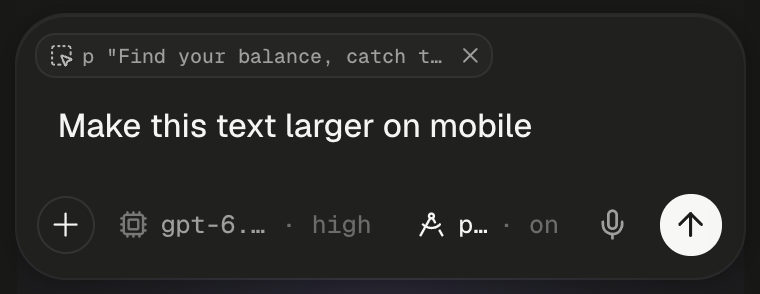
Type the change, such as “Make this text larger on mobile”, and send. For more elements, click Select again for each. Picking the same element twice adds nothing.
The picked paragraph waits as a chip above your text.
The chip describes the element: a unique CSS selector, the page, its size and position, its text, the styles that differ from the defaults, nearby text and its HTML. In a React app it also names the components around the element, and in a development build the source file and line that rendered it. IDs, class names and source paths that look like secrets, such as anything containing secret, password or api_key, are left out or become [redacted] before they leave the page. The element’s text and HTML go as they are.
Open Logs in the Preview toolbar and click the paperclip, “Attach the last lines to your next message”. The last 50 lines of the open tab become a chip: Preview console, or the server’s name followed by log. Read the logs covers the panel.
Use Draw when the problem is visual, or when you want several fixes at once. Click Draw in the Preview toolbar and a dock appears along the bottom of the page.
Control
What it does
Draw
Freehand pen
Arrow
An arrow from where you press to where you let go
Box
A rectangle around an area
Numbered pin
A numbered marker, so your message can say “pin 2 should be bigger”
Undo (Undo · ⌘Z)
Removes the last mark
Trash (Clear all marks)
Removes every mark and keeps you drawing
X (Cancel · Esc)
Leaves drawing and drops the marks
Add to chat
Captures the whole page with your marks and attaches it to your next message
The page keeps scrolling while you draw, and each mark stays pinned to what it was drawn over. Add to chat captures the whole page, not only the visible part, so you can mark the header and the footer in one go. The picture lands in the composer as an image attachment, and the agent is told your marks point at what you mean.
A box and an arrow mark the heading, and Add to chat waits at the end of the dock.
Capture gives up after 30 seconds with “The page did not answer the screenshot request in time.” Marks live in the page, so a reload, such as the one at the end of each turn, clears them. Pictures up to 15 MB reach the model as images.
Use Edit when you know the exact value you want. Click Edit in the Preview toolbar and a panel opens over the right edge of the page. Click an element, and the panel shows Text, Text colour, Background, Font size, Weight, Padding, Margin and Radius for it. The page shows each change as you make it. Text appears only for an element that holds text and no other elements.Apply changes sends the list as a message, which starts a turn, or steers or queues if the agent is busy. Until the agent’s turn ends, your changes are only a layer on the page, so a reload drops them. Esc or the panel’s X discards every change. Edit waits while the Preview shows the saved copy of a sleeping app: “Editing waits for the live page”.
Select text in a file and Add to prompt floats under the selection. Click it, or press ⌘⇧L. In the code editor it is also in the right-click menu as Add selection to prompt.
Viewer
What the chip holds
Code
The selected lines with the file path and line range. The chip reads like server.js:6-13.
Markdown
The selected text, with the file path and the source lines it came from
PDF
The selected text, with the file and page
Word and PowerPoint
The selected text, quoted with its page or slide numbers
Excel, CSV and TSV
Cells, a range, a row, a column or the whole sheet, as a Markdown table plus the formulas behind it
Excalidraw
Each selected shape: what it is and says, an arrow’s ends and its frame
Excalidraw has no shortcut, because ⌘⇧L is the editor’s own lock key there. Use the floating button.
Each viewer keeps its pointing tools at the right end of the file’s header: a pencil to draw and, in PDFs, HTML files and decks, a dashed pointer to pick. In Office files and BPMN diagrams, a plain click picks. File viewers covers what each viewer shows.
File
Pick
Draw and Add to chat
PDF
Click a paragraph, image, chart, table or link. Hold ⇧ to narrow to one line, or ⌥ to widen to the region around it, such as the whole table around a cell.
Marks stay on their page through zoom and reload. The marked pages go as one picture labelled by page.
Word, Excel, PowerPoint
Click a chart, picture or shape. Word paragraphs and tables and Excel cells can’t be clicked, so select them instead.
The page holds still while the pen is on
HTML file
Click an element, as in the Preview. Edit works here too.
The page with your marks
Deck
Click an element on the slide. Edit works here too.
Chips wait above your text until you send. Click a chip’s X to remove it, or hover it to read the start of what it holds. On send, each chip’s context goes ahead of your text, in the order you added them. A code selection, for example, arrives as Selected context — server.js (lines 7-13): followed by the lines.
A chip waits above your text until you send.
The transcript shows the same chips above your sent text. If a send fails, the chips come back. Opening another session drops chips you haven’t sent, and editing a queued message turns its chips into plain text.
Pair a pointer with one short sentence of intent. “Make this match the header” with an element chip beats a paragraph describing where the button is.
Switch ports, test phone and tablet widths, and read the app’s console.
File viewers
Which viewer opens each file type, and what it can’t do.
Slides, drawings and diagrams
Fix a slide by pointing at it, then export to PowerPoint or PDF.
Queue, steer or stop
Send a pick while the agent works, and decide whether it joins the turn.
⌘I
{"docsConfig":{"theme":"maple","$schema":"https://mintlify.com/docs.json","name":"Alpha","colors":{"primary":"#1A54F0","light":"#749FF9","dark":"#1A54F0"},"logo":{"light":"https://mintcdn.com/lyzr-15a99e0f/peFm_Sv4KgaR4cun/images/logo/light.png?fit=max\u0026auto=format\u0026n=peFm_Sv4KgaR4cun\u0026q=85\u0026s=633788f52e3e9a8128bdaf2d7a62fff6","dark":"https://mintcdn.com/lyzr-15a99e0f/peFm_Sv4KgaR4cun/images/logo/dark.png?fit=max\u0026auto=format\u0026n=peFm_Sv4KgaR4cun\u0026q=85\u0026s=cca4899a3c056f427f80610ac85d1170","href":"https://alpha.new"},"favicon":"https://mintcdn.com/lyzr-15a99e0f/peFm_Sv4KgaR4cun/images/favicon.png?fit=max\u0026auto=format\u0026n=peFm_Sv4KgaR4cun\u0026q=85\u0026s=606bf8d8b1dd77e7fc7d13b52bd06f85","appearance":{"default":"system","strict":false},"background":{"color":{"light":"#FAFAF9","dark":"#0E0E0D"}},"navbar":{"primary":{"type":"button","label":"Open Alpha","href":"https://alpha.new"}},"footer":{"socials":{"github":"https://github.com/suyash-lyzr/alpha-documentation"}},"search":{"prompt":"Search docs"},"seo":{"metatags":{"og:site_name":"Alpha docs"}},"fonts":{"family":"Geist"},"icons":{"library":"fontawesome"},"styling":{"eyebrows":"section","codeblocks":"system","latex":false},"contextual":{"options":["copy","view","chatgpt","claude"],"display":"header"},"navigation":{"pages":[]}},"deployment":{"deploymentMetadataValue":{"subdomain":"lyzr-15a99e0f","hasAudioNarration":false,"actualSubdomain":"lyzr-15a99e0f","customDomains":["docs.alpha.new"],"gitSource":{"type":"github","owner":"suyash-lyzr","repo":"alpha-documentation","deployBranch":"main","contentDirectory":"","isPrivate":false,"mountPath":"","label":"","_id":"6ae0b4f093d54c7ebe38e84c"},"chroma":{"latestBuiltDeploymentHistoryId":"6ae13f861208be8074bfe6ae","collectionId":"f29f48d5-ee52-4ae6-bbf8-057abb985ef7","liveDeploymentHistoryId":"6ae13f861208be8074bfe6ae","schemaVersion":"v3"},"entitlements":{"AI_CHAT":{"status":"ENABLED"},"WEB_MCP":{"status":"ENABLED"},"NARRATION":{"status":"ENABLED"}},"buildId":"6ae13f861208be8074bfe6ae","clientVersion":"0.0.3990","searchFilterCounts":[{"language":"default","tag":"Build","count":22},{"language":"default","tag":"Get started","count":17},{"language":"default","tag":"Reference","count":12},{"language":"default","tag":"Workspace","count":10},{"language":"default","tag":"Ship","count":8},{"language":"default","tag":"Agents","count":7},{"language":"default","tag":"Connect","count":7},{"language":"default","tag":"Chat with the agent","count":6},{"language":"default","tag":"Sessions","count":6},{"language":"default","tag":"Guides","count":5}]},"assistantConfig":{"enableAskAiButton":false,"enableStarterQuestions":false,"enableContextualStarterQuestions":false,"enableAskAiSearchBar":true},"basePath":"","hasChatPermissions":true,"hasWebMcpPermissions":true,"toggles":[{"name":"kill-isr","enabled":true,"variant":{"name":"disabled","enabled":false,"feature_enabled":true},"impressionData":false},{"name":"agent-mintlify-slack","enabled":true,"variant":{"name":"disabled","enabled":false,"feature_enabled":true},"impressionData":false},{"name":"editor-v7-file-tree","enabled":true,"variant":{"name":"disabled","enabled":false,"feature_enabled":true},"impressionData":false},{"name":"agent-integrations-settings","enabled":true,"variant":{"name":"disabled","enabled":false,"feature_enabled":true},"impressionData":false},{"name":"automations-pr-grouping","enabled":true,"variant":{"name":"disabled","enabled":false,"feature_enabled":true},"impressionData":false},{"name":"custom-prefix","enabled":true,"variant":{"name":"disabled","enabled":false,"feature_enabled":true},"impressionData":false},{"name":"analytics-v7","enabled":true,"variant":{"name":"disabled","enabled":false,"feature_enabled":true},"impressionData":false},{"name":"user-flows-analytics","enabled":true,"variant":{"name":"disabled","enabled":false,"feature_enabled":true},"impressionData":false},{"name":"no-publish-flow","enabled":true,"variant":{"name":"disabled","enabled":false,"feature_enabled":true},"impressionData":false},{"name":"workos-onboarding","enabled":true,"variant":{"name":"disabled","enabled":false,"feature_enabled":true},"impressionData":false},{"name":"llms-txt-v2","enabled":true,"variant":{"name":"disabled","enabled":false,"feature_enabled":true},"impressionData":false},{"name":"pause-universal-search-reconcile","enabled":true,"variant":{"name":"disabled","enabled":false,"feature_enabled":true},"impressionData":false},{"name":"snapshot-serving-live","enabled":true,"variant":{"name":"disabled","enabled":false,"feature_enabled":true},"impressionData":false},{"name":"stripTemperatureMiddleware","enabled":true,"variant":{"name":"disabled","enabled":false,"feature_enabled":true},"impressionData":false},{"name":"per-site-search-delta","enabled":true,"variant":{"name":"disabled","enabled":false,"feature_enabled":true},"impressionData":false},{"name":"support-platform-pylon-zendesk","enabled":true,"variant":{"name":"disabled","enabled":false,"feature_enabled":true},"impressionData":false},{"name":"snapshot-serving","enabled":true,"variant":{"name":"disabled","enabled":false,"feature_enabled":true},"impressionData":false},{"name":"instant-rollback","enabled":true,"variant":{"name":"disabled","enabled":false,"feature_enabled":true},"impressionData":false},{"name":"granular-notifications-server","enabled":true,"variant":{"name":"disabled","enabled":false,"feature_enabled":true},"impressionData":false},{"name":"granular-notifications","enabled":true,"variant":{"name":"disabled","enabled":false,"feature_enabled":true},"impressionData":false},{"name":"editor-private-page-search","enabled":true,"variant":{"name":"disabled","enabled":false,"feature_enabled":true},"impressionData":false},{"name":"automations-fable","enabled":true,"variant":{"name":"disabled","enabled":false,"feature_enabled":true},"impressionData":false},{"name":"fixed-ai-action-pricing","enabled":true,"variant":{"name":"disabled","enabled":false,"feature_enabled":true},"impressionData":false},{"name":"automation-resolve-merge-conflict","enabled":true,"variant":{"name":"disabled","enabled":false,"feature_enabled":true},"impressionData":false},{"name":"scoped-publishing","enabled":true,"variant":{"name":"disabled","enabled":false,"feature_enabled":true},"impressionData":false},{"name":"mintql","enabled":true,"variant":{"name":"disabled","enabled":false,"feature_enabled":true},"impressionData":false},{"name":"page-level-analytics","enabled":true,"variant":{"name":"disabled","enabled":false,"feature_enabled":true},"impressionData":false},{"name":"editor-version-history-v2","enabled":true,"variant":{"name":"disabled","enabled":false,"feature_enabled":true},"impressionData":false},{"name":"editor-nav-generations","enabled":true,"variant":{"name":"disabled","enabled":false,"feature_enabled":true},"impressionData":false},{"name":"billing-page-v2","enabled":true,"variant":{"name":"disabled","enabled":false,"feature_enabled":true},"impressionData":false},{"name":"workspace-projects","enabled":true,"variant":{"name":"disabled","enabled":false,"feature_enabled":true},"impressionData":false},{"name":"assistant-v5","enabled":true,"variant":{"name":"disabled","enabled":false,"feature_enabled":true},"impressionData":false},{"name":"byok-sep-25","enabled":true,"variant":{"name":"disabled","enabled":false,"feature_enabled":true},"impressionData":false},{"name":"fork-pr-previews","enabled":true,"variant":{"name":"disabled","enabled":false,"feature_enabled":true},"impressionData":false},{"name":"revalidation-jwt","enabled":true,"variant":{"name":"disabled","enabled":false,"feature_enabled":true},"impressionData":false},{"name":"vite-origin","enabled":true,"variant":{"name":"disabled","enabled":false,"feature_enabled":true},"impressionData":false},{"name":"editor-agent-model-picker","enabled":true,"variant":{"name":"disabled","enabled":false,"feature_enabled":true},"impressionData":false},{"name":"billing-updated-9-15","enabled":true,"variant":{"name":"disabled","enabled":false,"feature_enabled":true},"impressionData":false},{"name":"workos-sso-scim","enabled":true,"variant":{"name":"disabled","enabled":false,"feature_enabled":true},"impressionData":false},{"name":"hobby-abuse-scan","enabled":true,"variant":{"name":"disabled","enabled":false,"feature_enabled":true},"impressionData":false},{"name":"dashboard-inbox","enabled":true,"variant":{"name":"disabled","enabled":false,"feature_enabled":true},"impressionData":false},{"name":"workos-signup","enabled":true,"variant":{"name":"disabled","enabled":false,"feature_enabled":true},"impressionData":false},{"name":"workos-enabled","enabled":true,"variant":{"name":"disabled","enabled":false,"feature_enabled":true},"impressionData":false}],"isAtlas":false,"googleFontsInlined":true},"customCss":[{"filePath":"style.css","content":"/* cyrillic-ext */\n@font-face {\n font-family: 'Geist Mono';\n font-style: normal;\n font-weight: 400;\n font-display: swap;\n src: url(/_mintlify/assets/fonts/google/s/geistmono/v6/or3nQ6H-1_WfwkMZI_qYFrodmgPn.woff2) format('woff2');\n unicode-range: U+0460-052F, U+1C80-1C8A, U+20B4, U+2DE0-2DFF, U+A640-A69F, U+FE2E-FE2F;\n}\n/* cyrillic */\n@font-face {\n font-family: 'Geist Mono';\n font-style: normal;\n font-weight: 400;\n font-display: swap;\n src: url(/_mintlify/assets/fonts/google/s/geistmono/v6/or3nQ6H-1_WfwkMZI_qYFrMdmgPn.woff2) format('woff2');\n unicode-range: U+0301, U+0400-045F, U+0490-0491, U+04B0-04B1, U+2116;\n}\n/* symbols2 */\n@font-face {\n font-family: 'Geist Mono';\n font-style: normal;\n font-weight: 400;\n font-display: swap;\n src: url(/_mintlify/assets/fonts/google/s/geistmono/v6/or3nQ6H-1_WfwkMZI_qYFg08vz7ehw.woff2) format('woff2');\n unicode-range: U+2000-2001, U+2004-2008, U+200A, U+23B8-23BD, U+2500-259F;\n}\n/* vietnamese */\n@font-face {\n font-family: 'Geist Mono';\n font-style: normal;\n font-weight: 400;\n font-display: swap;\n src: url(/_mintlify/assets/fonts/google/s/geistmono/v6/or3nQ6H-1_WfwkMZI_qYFrgdmgPn.woff2) format('woff2');\n unicode-range: U+0102-0103, U+0110-0111, U+0128-0129, U+0168-0169, U+01A0-01A1, U+01AF-01B0, U+0300-0301, U+0303-0304, U+0308-0309, U+0323, U+0329, U+1EA0-1EF9, U+20AB;\n}\n/* latin-ext */\n@font-face {\n font-family: 'Geist Mono';\n font-style: normal;\n font-weight: 400;\n font-display: swap;\n src: url(/_mintlify/assets/fonts/google/s/geistmono/v6/or3nQ6H-1_WfwkMZI_qYFrkdmgPn.woff2) format('woff2');\n unicode-range: U+0100-02BA, U+02BD-02C5, U+02C7-02CC, U+02CE-02D7, U+02DD-02FF, U+0304, U+0308, U+0329, U+1D00-1DBF, U+1E00-1E9F, U+1EF2-1EFF, U+2020, U+20A0-20AB, U+20AD-20C4, U+2113, U+2C60-2C7F, U+A720-A7FF;\n}\n/* latin */\n@font-face {\n font-family: 'Geist Mono';\n font-style: normal;\n font-weight: 400;\n font-display: swap;\n src: url(/_mintlify/assets/fonts/google/s/geistmono/v6/or3nQ6H-1_WfwkMZI_qYFrcdmg.woff2) format('woff2');\n unicode-range: U+0000-00FF, U+0131, U+0152-0153, U+02BB-02BC, U+02C6, U+02DA, U+02DC, U+0304, U+0308, U+0329, U+2000-206F, U+20AC, U+2122, U+2191, U+2193, U+2212, U+2215, U+FEFF, U+FFFD;\n}\n/* cyrillic-ext */\n@font-face {\n font-family: 'Geist Mono';\n font-style: normal;\n font-weight: 500;\n font-display: swap;\n src: url(/_mintlify/assets/fonts/google/s/geistmono/v6/or3nQ6H-1_WfwkMZI_qYFrodmgPn.woff2) format('woff2');\n unicode-range: U+0460-052F, U+1C80-1C8A, U+20B4, U+2DE0-2DFF, U+A640-A69F, U+FE2E-FE2F;\n}\n/* cyrillic */\n@font-face {\n font-family: 'Geist Mono';\n font-style: normal;\n font-weight: 500;\n font-display: swap;\n src: url(/_mintlify/assets/fonts/google/s/geistmono/v6/or3nQ6H-1_WfwkMZI_qYFrMdmgPn.woff2) format('woff2');\n unicode-range: U+0301, U+0400-045F, U+0490-0491, U+04B0-04B1, U+2116;\n}\n/* symbols2 */\n@font-face {\n font-family: 'Geist Mono';\n font-style: normal;\n font-weight: 500;\n font-display: swap;\n src: url(/_mintlify/assets/fonts/google/s/geistmono/v6/or3nQ6H-1_WfwkMZI_qYFg08vz7ehw.woff2) format('woff2');\n unicode-range: U+2000-2001, U+2004-2008, U+200A, U+23B8-23BD, U+2500-259F;\n}\n/* vietnamese */\n@font-face {\n font-family: 'Geist Mono';\n font-style: normal;\n font-weight: 500;\n font-display: swap;\n src: url(/_mintlify/assets/fonts/google/s/geistmono/v6/or3nQ6H-1_WfwkMZI_qYFrgdmgPn.woff2) format('woff2');\n unicode-range: U+0102-0103, U+0110-0111, U+0128-0129, U+0168-0169, U+01A0-01A1, U+01AF-01B0, U+0300-0301, U+0303-0304, U+0308-0309, U+0323, U+0329, U+1EA0-1EF9, U+20AB;\n}\n/* latin-ext */\n@font-face {\n font-family: 'Geist Mono';\n font-style: normal;\n font-weight: 500;\n font-display: swap;\n src: url(/_mintlify/assets/fonts/google/s/geistmono/v6/or3nQ6H-1_WfwkMZI_qYFrkdmgPn.woff2) format('woff2');\n unicode-range: U+0100-02BA, U+02BD-02C5, U+02C7-02CC, U+02CE-02D7, U+02DD-02FF, U+0304, U+0308, U+0329, U+1D00-1DBF, U+1E00-1E9F, U+1EF2-1EFF, U+2020, U+20A0-20AB, U+20AD-20C4, U+2113, U+2C60-2C7F, U+A720-A7FF;\n}\n/* latin */\n@font-face {\n font-family: 'Geist Mono';\n font-style: normal;\n font-weight: 500;\n font-display: swap;\n src: url(/_mintlify/assets/fonts/google/s/geistmono/v6/or3nQ6H-1_WfwkMZI_qYFrcdmg.woff2) format('woff2');\n unicode-range: U+0000-00FF, U+0131, U+0152-0153, U+02BB-02BC, U+02C6, U+02DA, U+02DC, U+0304, U+0308, U+0329, U+2000-206F, U+20AC, U+2122, U+2191, U+2193, U+2212, U+2215, U+FEFF, U+FFFD;\n}\n:root{--a-canvas:#f0f0ef;--a-bg:#fafaf9;--a-card:#ffffff;--a-fill:#f2f2f1;--a-fg:#161614;--a-soft:#3c3c39;--a-muted:#636361;--a-border:rgb(22 22 20 / 9%);--a-signal:#1a54f0;--a-signal-soft:rgb(26 84 240 / 8%);--a-radius:0.7rem;--a-shadow-card:0 0 0 1px var(--a-border), 0 1px 2px rgb(22 22 20 / 4%), 0 2px 6px rgb(22 22 20 / 4%);--a-shadow-raised:0 0 0 1px var(--a-border), 0 2px 10px rgb(22 22 20 / 7%)}.dark{--a-canvas:#0e0e0d;--a-bg:#0e0e0d;--a-card:#181817;--a-fill:#20201f;--a-fg:#f5f5f4;--a-soft:#d6d6d3;--a-muted:#9f9f9a;--a-border:rgb(255 255 255 / 8%);--a-signal:#749ff9;--a-signal-soft:rgb(116 159 249 / 10%);--a-shadow-card:0 0 0 1px var(--a-border), inset 0 1px 0 rgb(255 255 255 / 4%), 0 1px 2px rgb(0 0 0 / 25%);--a-shadow-raised:0 0 0 1px var(--a-border), inset 0 1px 0 rgb(255 255 255 / 5%), 0 2px 12px rgb(0 0 0 / 30%)}code,kbd,pre{font-family:\"Geist Mono\",ui-monospace,\"SF Mono\",Menlo,monospace!important}#page-title{font-size:1.75rem!important;line-height:1.2!important;font-weight:600!important;letter-spacing:-.025em!important}#header .eyebrow{font-size:.75rem;font-weight:500;letter-spacing:.01em}#content-area .prose{font-size:.9375rem;line-height:1.7}#content-area .prose h2{font-size:1.25rem;font-weight:600;letter-spacing:-.015em;margin-top:2.5rem}#content-area .prose h3{font-size:1rem;font-weight:600;letter-spacing:-.01em}#content-area .prose li,#content-area .prose p{color:var(--a-soft)}#content-area .prose strong{color:var(--a-fg);font-weight:560}#content-area .prose a{text-decoration-color:color-mix(in oklab,var(--a-signal) 45%,transparent);text-underline-offset:3px}::selection{background:var(--a-signal-soft)}#sidebar-content{font-size:.875rem}#content-area .prose table,#table-of-contents{font-size:.8125rem}.callout,.card{border-radius:var(--a-radius)!important;box-shadow:var(--a-shadow-card)}.card{border-color:transparent!important;background:var(--a-card);transition:box-shadow 150ms ease}.card[role=link]:hover,a.card:hover{box-shadow:0 0 0 1px color-mix(in oklab,var(--a-signal) 55%,transparent),0 2px 10px rgb(22 22 20/6%)}.card [data-component-part=card-content-container]{display:flex;align-items:flex-start;gap:.75rem;padding:.875rem 1rem!important}.card [data-component-part=card-icon]{flex:none;width:1.75rem!important;height:1.75rem!important;margin:0!important;display:grid;place-items:center;border-radius:.45rem;background:var(--a-fill);box-shadow:0 0 0 1px var(--a-border)}.card [data-component-part=card-icon] svg{width:.875rem!important;height:.875rem!important;background-color:var(--a-soft)!important}.card [data-component-part=card-title],.card [data-component-part=card-title] *{margin-top:0!important;padding-top:.25rem;font-size:.875rem!important;line-height:1.3!important;font-weight:600;letter-spacing:-.01em}.card [data-component-part=card-content]{margin-top:0!important;font-size:.8125rem!important;line-height:1.5!important;color:var(--a-muted)}.card [data-component-part=card-content] *{font-size:inherit!important;line-height:inherit!important}.callout{border:0!important;background:var(--a-card)!important;font-size:.875rem}.callout [data-component-part=callout-icon] svg{color:var(--a-muted)!important}.callout[data-callout-type=warning] [data-component-part=callout-icon] svg{color:#c27c0e!important}.callout[data-callout-type=check] [data-component-part=callout-icon] svg{color:#1f8a5b!important}.callout [data-component-part=callout-content],.callout [data-component-part=callout-content] p{color:var(--a-soft)!important}[data-component-part=frame]{border-radius:calc(var(--a-radius)*1.4)!important;background:var(--a-fill)!important;border:0!important;box-shadow:0 0 0 1px var(--a-border);padding:.5rem!important}[data-component-part=frame] img,[data-component-part=frame] video{border-radius:var(--a-radius)!important;box-shadow:var(--a-shadow-raised)}[data-component-part=frame-caption]{font-size:.8125rem;color:var(--a-muted)}[data-component-part=step-number]{font-family:\"Geist Mono\",ui-monospace,monospace;font-size:.75rem!important}[data-component-part=step-title]{font-weight:600;letter-spacing:-.01em}#content-area .prose th{font-weight:560;color:var(--a-muted)}.prose :not(pre)>code{font-size:.8125rem;border-radius:.35rem}kbd{display:inline-block;min-width:1.4em;padding:.05em .4em;font-size:.75rem;line-height:1.5;text-align:center;color:var(--a-fg);background:var(--a-card);border-radius:.35rem;box-shadow:0 0 0 1px var(--a-border),0 1px 0 var(--a-border)}.prompt-card{margin:1.5rem 0;padding:.25rem .75rem .5rem;border-radius:calc(var(--a-radius)*1.4);background:var(--a-fill);box-shadow:0 0 0 1px var(--a-border)}.prompt-card-label{margin:.6rem .25rem -.25rem;font-size:.75rem;font-weight:500;color:var(--a-muted)}@media (max-width:640px){#page-title{font-size:1.5rem!important}#content-area .prose table{display:block;overflow-x:auto}}#content-area .prose table{width:100%;table-layout:fixed}#content-area .prose td,#content-area .prose th{overflow-wrap:anywhere;vertical-align:top}#alpha-top-actions{position:fixed;top:.5rem;right:1.5rem;z-index:40;display:flex;align-items:center;gap:1rem}#alpha-top-actions[hidden]{display:none}#alpha-changelog-link{font-size:.8125rem;font-weight:500;color:var(--a-muted);text-decoration:none;transition:color 150ms ease}#alpha-changelog-link:hover{color:var(--a-fg)}#alpha-ask-ai{display:inline-flex;align-items:center;gap:.4rem;height:2rem;padding:0 .5rem 0 .75rem;border-radius:999px;font-size:.8125rem;font-weight:560;color:var(--a-signal);background:var(--a-signal-soft);box-shadow:0 0 0 1px color-mix(in oklab,var(--a-signal) 35%,transparent);cursor:pointer;transition:background 150ms ease,box-shadow 150ms ease}#alpha-ask-ai:hover{background:color-mix(in oklab,var(--a-signal) 18%,transparent);box-shadow:0 0 0 1px color-mix(in oklab,var(--a-signal) 60%,transparent)}#alpha-ask-ai[hidden]{display:none}#alpha-ask-ai kbd{padding:0 .35em;font-size:.6875rem;color:inherit;background:0 0;box-shadow:0 0 0 1px color-mix(in oklab,var(--a-signal) 30%,transparent)}@media (max-width:1023px){#alpha-top-actions{display:none}}.card-group:is([style*=\"--cols:3\"], [style*=\"--cols: 3\"], [style*=\"--cols:4\"], [style*=\"--cols: 4\"]) .card [data-component-part=card-content-container]{display:block;padding:1rem!important}.card-group:is([style*=\"--cols:3\"], [style*=\"--cols: 3\"], [style*=\"--cols:4\"], [style*=\"--cols: 4\"]) .card [data-component-part=card-icon]{margin-bottom:.75rem!important}.card-group:is([style*=\"--cols:3\"], [style*=\"--cols: 3\"], [style*=\"--cols:4\"], [style*=\"--cols: 4\"]) .card [data-component-part=card-title]{padding-top:0}.card-group:is([style*=\"--cols:3\"], [style*=\"--cols: 3\"], [style*=\"--cols:4\"], [style*=\"--cols: 4\"]) .card [data-component-part=card-content]{margin-top:.25rem!important}:root{--content-width:46rem}html.alpha-sidebar-collapsed{--sidebar-width:0px;--content-width:54rem}html.alpha-sidebar-collapsed #sidebar{display:none!important}#alpha-sidebar-toggle{position:fixed;top:.6875rem;left:calc(var(--sidebar-width, 19rem) + .5rem);z-index:40;display:grid;place-items:center;width:1.625rem;height:1.625rem;border-radius:.45rem;color:var(--a-muted);cursor:pointer;transition:color 150ms ease,background 150ms ease}#alpha-sidebar-toggle:hover{color:var(--a-fg);background:var(--a-fill)}html.alpha-sidebar-collapsed #alpha-sidebar-toggle{color:var(--a-signal)}@media (max-width:1023px){#alpha-sidebar-toggle{display:none}}.update-container{flex-direction:column!important;gap:1rem!important}.update-container>div:first-child{position:static!important;width:100%!important;display:flex!important;flex-direction:row!important;flex-wrap:wrap;align-items:center!important;gap:.5rem;padding-bottom:1rem;border-bottom:1px solid var(--a-border)}.update-container [data-component-part=update-description]{order:-1;flex-basis:100%;max-width:none!important;margin:0 0 .125rem!important;font-size:1.25rem!important;line-height:1.3!important;font-weight:600!important;letter-spacing:-.015em;color:var(--a-fg)!important}.update-container [data-component-part=update-label]{padding:0!important;background:0 0!important;font-size:.8125rem!important;font-weight:500!important;color:var(--a-muted)!important}.update-container [data-component-part=update-label]::after{content:\"·\";margin-left:.5rem;color:var(--a-muted)}.update-container [data-component-part=update-tag-list]{display:flex;flex-wrap:wrap;gap:.375rem;margin:0!important}.update-container [data-component-part=update-tag]{margin:0!important;padding:.0625rem .5rem!important;border-radius:999px;font-size:.75rem!important;font-weight:500!important;line-height:1.5!important;color:var(--a-soft)!important;background:var(--a-fill)!important;box-shadow:0 0 0 1px var(--a-border)}.update-container [data-component-part=update-content]{width:100%}.update-container [data-component-part=update-content],.update-container [data-component-part=update-description]{padding-left:0!important;padding-right:0!important}.update-container [data-component-part=update-content]>:first-child{margin-left:0!important}#pagination [data-component-part=pagination-next]>div{justify-content:space-between!important}#pagination [data-component-part=pagination-next]>div>div:first-child{flex:1;align-items:flex-start!important;gap:.125rem}#pagination [data-component-part=pagination-description],#pagination [data-component-part=pagination-title]{width:100%!important;max-width:none!important;text-align:left!important}#pagination [data-component-part=pagination-description]{font-size:.8125rem}"}],"page":{"pagePath":"workspace/point-and-draw","slug":"/workspace/point-and-draw","pageMetadata":{"title":"Point at and draw on your app","sidebarTitle":"Point and draw","description":"Click an element, draw on the page or select text in any file, and the agent gets exactly what you mean.","href":"/workspace/point-and-draw"},"description":{"compiledSource":"\"use strict\";\nconst {jsx: _jsx} = arguments[0];\nconst {useMDXComponents: _provideComponents} = arguments[0];\nfunction _createMdxContent(props) {\n const _components = {\n p: \"p\",\n ..._provideComponents(),\n ...props.components\n };\n return _jsx(_components.p, {\n children: \"Click an element, draw on the page or select text in any file, and the agent gets exactly what you mean.\"\n });\n}\nfunction MDXContent(props = {}) {\n const {wrapper: MDXLayout} = {\n ..._provideComponents(),\n ...props.components\n };\n return MDXLayout ? _jsx(MDXLayout, {\n ...props,\n children: _jsx(_createMdxContent, {\n ...props\n })\n }) : _createMdxContent(props);\n}\nreturn {\n default: MDXContent\n};\n","frontmatter":{},"scope":{}},"pageType":"default","mdx":{"mdxSource":{"compiledSource":"\"use strict\";const{Fragment:_Fragment,jsx:_jsx,jsxs:_jsxs}=arguments[0];const{useMDXComponents:_provideComponents}=arguments[0];const imageMax=`15 MB`;function _createMdxContent(props){const _components={a:`a`,code:`code`,p:`p`,strong:`strong`,tbody:`tbody`,td:`td`,th:`th`,thead:`thead`,tr:`tr`,..._provideComponents(),...props.components},{Card,CardGroup,Frame,Heading,Note,OptimizedImage,Step,Steps,Table,Tip}=_components;if(!Card)_missingMdxReference(`Card`,true);if(!CardGroup)_missingMdxReference(`CardGroup`,true);if(!Frame)_missingMdxReference(`Frame`,true);if(!Heading)_missingMdxReference(`Heading`,true);if(!Note)_missingMdxReference(`Note`,true);if(!OptimizedImage)_missingMdxReference(`OptimizedImage`,true);if(!Step)_missingMdxReference(`Step`,true);if(!Steps)_missingMdxReference(`Steps`,true);if(!Table)_missingMdxReference(`Table`,true);if(!Tip)_missingMdxReference(`Tip`,true);return _jsxs(_Fragment,{children:[_jsxs(_components.p,{children:[`Pointing attaches the exact thing you mean to your next message: an element in your running app, a marked-up picture of the page, or lines from a file. For the Preview’s other controls, see `,_jsx(_components.a,{href:`/workspace/preview`,children:`Preview your app`}),`. To upload a file of your own, use `,_jsx(_components.a,{href:`/chat/composer#attach-files`,children:`the composer`}),`.`]}),`\n`,_jsx(Heading,{level:`2`,id:`choose-how-to-point`,children:`Choose how to point`}),`\n`,_jsx(_components.p,{children:`Each way to point stages something in the composer. Nothing reaches the agent until you send.`}),`\n`,_jsxs(Table,{children:[_jsx(_components.thead,{children:_jsxs(_components.tr,{children:[_jsx(_components.th,{children:`Way`}),_jsx(_components.th,{children:`Where it works`}),_jsx(_components.th,{children:`What the agent gets`}),_jsx(_components.th,{children:`Shortcut`})]})}),_jsxs(_components.tbody,{children:[_jsxs(_components.tr,{children:[_jsxs(_components.td,{children:[_jsx(_components.strong,{children:`Select`}),` (dashed pointer)`]}),_jsx(_components.td,{children:`The Preview, HTML files, decks and PDFs. In Office files and BPMN diagrams, a plain click picks.`}),_jsx(_components.td,{children:`A chip describing the element: where it is in the code, what it says and how it is styled`}),_jsxs(_components.td,{children:[`None. `,_jsx(`kbd`,{children:`Esc`}),` cancels.`]})]}),_jsxs(_components.tr,{children:[_jsxs(_components.td,{children:[_jsx(_components.strong,{children:`Draw`}),` (pencil)`]}),_jsx(_components.td,{children:`The Preview, HTML files, decks, PDFs, Office files, Excalidraw drawings, BPMN diagrams`}),_jsx(_components.td,{children:`A picture of the view with your marks, attached like an uploaded image`}),_jsxs(_components.td,{children:[_jsx(`kbd`,{children:`⌘`}),_jsx(`kbd`,{children:`Z`}),` undoes a mark`]})]}),_jsxs(_components.tr,{children:[_jsx(_components.td,{children:_jsx(_components.strong,{children:`Add to prompt`})}),_jsx(_components.td,{children:`Selected text in the code, Markdown, PDF and Office viewers; selected cells in spreadsheets; a clicked BPMN element; selected shapes in Excalidraw`}),_jsx(_components.td,{children:`A chip holding the exact text or cells, with the file and lines, page or range`}),_jsxs(_components.td,{children:[_jsx(`kbd`,{children:`⌘`}),_jsx(`kbd`,{children:`⇧`}),_jsx(`kbd`,{children:`L`})]})]}),_jsxs(_components.tr,{children:[_jsxs(_components.td,{children:[_jsx(_components.strong,{children:`Edit`}),` (paintbrush)`]}),_jsx(_components.td,{children:`The Preview, HTML files, decks`}),_jsx(_components.td,{children:`A list of text and style changes for the agent to put in the source`}),_jsxs(_components.td,{children:[_jsx(`kbd`,{children:`⌘`}),_jsx(`kbd`,{children:`Z`}),` undoes a change`]})]})]})]}),`\n`,_jsxs(_components.p,{children:[`Use Ctrl instead of ⌘ on Windows and Linux. `,_jsx(_components.strong,{children:`Select`}),`, `,_jsx(_components.strong,{children:`Draw`}),` and `,_jsx(_components.strong,{children:`Edit`}),` switch each other off, so only one is active over a page at a time.`]}),`\n`,_jsx(Note,{children:_jsxs(_components.p,{children:[`Only the session’s owner sees these tools. People you `,_jsx(_components.a,{href:`/sharing`,children:`share the session`}),` with can look at the Preview and the files, but they have no composer, so there is nothing to attach to.`]})}),`\n`,_jsx(Heading,{level:`2`,id:`pick-an-element-in-the-preview`,children:`Pick an element in the Preview`}),`\n`,_jsxs(_components.p,{children:[`Use `,_jsx(_components.strong,{children:`Select`}),` when words like “the second button in the card” would be ambiguous. The agent receives the element itself, not your description of it.`]}),`\n`,_jsxs(Steps,{children:[_jsxs(Step,{title:`Arm the picker`,children:[_jsxs(_components.p,{children:[`In the `,_jsx(_components.a,{href:`/workspace/preview`,children:`Preview`}),` toolbar, click `,_jsx(_components.strong,{children:`Select`}),`. Its tooltip changes to “Click an element in the preview — Esc cancels”. Until the app’s page has loaded, the button is greyed out with “Element picker loads with the app’s page”.`]}),_jsx(Frame,{caption:`The outline and label show exactly what a click will pick.`,children:_jsx(OptimizedImage,{src:`https://mintcdn.com/lyzr-15a99e0f/ObBpayiae_4aNgzN/images/workspace/preview-select-hover.png?fit=max\u0026auto=format\u0026n=ObBpayiae_4aNgzN\u0026q=85\u0026s=bce2266ff95b89b8c628f1300535b278`,alt:`The Preview of the Harbor Sailing School app at desktop width with Select on. The tab strip above reads Plan, Preview, Shell, Database, Secrets, README.md and server.js, then the + button, with GitHub, Share, the Publish pill and the files button at the right. In the toolbar, the Desktop icon is highlighted and the port pill reads node · 3000; at the right end, the dashed-pointer Select button is highlighted blue, between the pen for Draw and Open in new tab. In the page, the description under the Beginner Dinghy card's title, Find your balance, catch the breeze, and learn the sailing essentials., is outlined and tinted, and a small dark label just below it gives the tag, p, and the quoted start of its text, Find your balance, catch the breeze, and (tr…. Above the cards are the headline Good days start on the water., a sailboat photo, This week's classes with its count of 3 and the filters All classes, Beginner, Intermediate and All levels. The Intermediate Keelboat and Sunset Sail cards sit beside it, dated Friday, Oct 30 and Saturday, Oct 31.`,\"data-og-width\":`2148`,width:`2148`,\"data-og-height\":`1552`,height:`1552`,\"data-path\":`images/workspace/preview-select-hover.png`,\"data-optimize\":`true`,\"data-opv\":`3`,srcset:`https://mintcdn.com/lyzr-15a99e0f/ObBpayiae_4aNgzN/images/workspace/preview-select-hover.png?w=280\u0026fit=max\u0026auto=format\u0026n=ObBpayiae_4aNgzN\u0026q=85\u0026s=2fb9449ade7b2da5d2457efdabbca2a3 280w, https://mintcdn.com/lyzr-15a99e0f/ObBpayiae_4aNgzN/images/workspace/preview-select-hover.png?w=560\u0026fit=max\u0026auto=format\u0026n=ObBpayiae_4aNgzN\u0026q=85\u0026s=d1b25156e5bd52135029b98d5925191b 560w, https://mintcdn.com/lyzr-15a99e0f/ObBpayiae_4aNgzN/images/workspace/preview-select-hover.png?w=840\u0026fit=max\u0026auto=format\u0026n=ObBpayiae_4aNgzN\u0026q=85\u0026s=3865d9dd1c5475b143508a385333bb84 840w, https://mintcdn.com/lyzr-15a99e0f/ObBpayiae_4aNgzN/images/workspace/preview-select-hover.png?w=1100\u0026fit=max\u0026auto=format\u0026n=ObBpayiae_4aNgzN\u0026q=85\u0026s=a47e279849f8afa380837c915a9f0791 1100w, https://mintcdn.com/lyzr-15a99e0f/ObBpayiae_4aNgzN/images/workspace/preview-select-hover.png?w=1650\u0026fit=max\u0026auto=format\u0026n=ObBpayiae_4aNgzN\u0026q=85\u0026s=7e0c410b37b84ede098ed5712c7f2b52 1650w, https://mintcdn.com/lyzr-15a99e0f/ObBpayiae_4aNgzN/images/workspace/preview-select-hover.png?w=2500\u0026fit=max\u0026auto=format\u0026n=ObBpayiae_4aNgzN\u0026q=85\u0026s=31788ddb7196be7d6c3544684737c22b 2500w`})})]}),_jsx(Step,{title:`Click the element`,children:_jsxs(_components.p,{children:[`A ring and a label follow the pointer from element to element. Click the one you mean. It becomes a chip in the composer, and the picker switches off. `,_jsx(`kbd`,{children:`Esc`}),` leaves without picking.`]})}),_jsxs(Step,{title:`Say what to change, and send`,children:[_jsxs(_components.p,{children:[`Type the change, such as “Make this text larger on mobile”, and send. For more elements, click `,_jsx(_components.strong,{children:`Select`}),` again for each. Picking the same element twice adds nothing.`]}),_jsx(Frame,{caption:`The picked paragraph waits as a chip above your text.`,children:_jsx(OptimizedImage,{src:`https://mintcdn.com/lyzr-15a99e0f/ObBpayiae_4aNgzN/images/workspace/preview-select-chip.png?fit=max\u0026auto=format\u0026n=ObBpayiae_4aNgzN\u0026q=85\u0026s=bfafd78d7da9db7c700be1c070e4283e`,alt:`The composer of the Harbor bookings session with one chip above the typed text Make this text larger on mobile. The chip has a dashed-pointer icon, reads p and the quoted start of the paragraph it holds, Find your balance, catch t…, and has a small X on its right. Below the text sit the + button, the model chip gpt-6.… · high, the plan chip p… · on, a microphone and the white Send button.`,\"data-og-width\":`760`,width:`760`,\"data-og-height\":`294`,height:`294`,\"data-path\":`images/workspace/preview-select-chip.png`,\"data-optimize\":`true`,\"data-opv\":`3`,srcset:`https://mintcdn.com/lyzr-15a99e0f/ObBpayiae_4aNgzN/images/workspace/preview-select-chip.png?w=280\u0026fit=max\u0026auto=format\u0026n=ObBpayiae_4aNgzN\u0026q=85\u0026s=ee1a2ce501d8587ba7b00257ff7475da 280w, https://mintcdn.com/lyzr-15a99e0f/ObBpayiae_4aNgzN/images/workspace/preview-select-chip.png?w=560\u0026fit=max\u0026auto=format\u0026n=ObBpayiae_4aNgzN\u0026q=85\u0026s=36fcff1c0498c7fb9ad23e14e2823754 560w, https://mintcdn.com/lyzr-15a99e0f/ObBpayiae_4aNgzN/images/workspace/preview-select-chip.png?w=840\u0026fit=max\u0026auto=format\u0026n=ObBpayiae_4aNgzN\u0026q=85\u0026s=90255b0bc5f832d81ef5b1db214fbf16 840w, https://mintcdn.com/lyzr-15a99e0f/ObBpayiae_4aNgzN/images/workspace/preview-select-chip.png?w=1100\u0026fit=max\u0026auto=format\u0026n=ObBpayiae_4aNgzN\u0026q=85\u0026s=b6bc1a905c93abb47a59d1236d337e91 1100w, https://mintcdn.com/lyzr-15a99e0f/ObBpayiae_4aNgzN/images/workspace/preview-select-chip.png?w=1650\u0026fit=max\u0026auto=format\u0026n=ObBpayiae_4aNgzN\u0026q=85\u0026s=9878a7af8236d102cc6388f825b61025 1650w, https://mintcdn.com/lyzr-15a99e0f/ObBpayiae_4aNgzN/images/workspace/preview-select-chip.png?w=2500\u0026fit=max\u0026auto=format\u0026n=ObBpayiae_4aNgzN\u0026q=85\u0026s=c238b4f6f78d9c7d93e9e2d41f4616bf 2500w`})})]})]}),`\n`,_jsxs(_components.p,{children:[`The chip describes the element: a unique CSS selector, the page, its size and position, its text, the styles that differ from the defaults, nearby text and its HTML. In a React app it also names the components around the element, and in a development build the source file and line that rendered it. IDs, class names and source paths that look like secrets, such as anything containing `,_jsx(_components.code,{children:`secret`}),`, `,_jsx(_components.code,{children:`password`}),` or `,_jsx(_components.code,{children:`api_key`}),`, are left out or become `,_jsx(_components.code,{children:`[redacted]`}),` before they leave the page. The element’s text and HTML go as they are.`]}),`\n`,_jsx(Heading,{level:`3`,id:`attach-the-preview’s-logs`,children:`Attach the Preview’s logs`}),`\n`,_jsxs(_components.p,{children:[`Open `,_jsx(_components.strong,{children:`Logs`}),` in the Preview toolbar and click the paperclip, “Attach the last lines to your next message”. The last 50 lines of the open tab become a chip: `,_jsx(_components.strong,{children:`Preview console`}),`, or the server’s name followed by `,_jsx(_components.strong,{children:`log`}),`. `,_jsx(_components.a,{href:`/workspace/preview#read-the-logs`,children:`Read the logs`}),` covers the panel.`]}),`\n`,_jsx(Heading,{level:`2`,id:`draw-on-the-preview`,children:`Draw on the Preview`}),`\n`,_jsxs(_components.p,{children:[`Use `,_jsx(_components.strong,{children:`Draw`}),` when the problem is visual, or when you want several fixes at once. Click `,_jsx(_components.strong,{children:`Draw`}),` in the Preview toolbar and a dock appears along the bottom of the page.`]}),`\n`,_jsxs(Table,{children:[_jsx(_components.thead,{children:_jsxs(_components.tr,{children:[_jsx(_components.th,{children:`Control`}),_jsx(_components.th,{children:`What it does`})]})}),_jsxs(_components.tbody,{children:[_jsxs(_components.tr,{children:[_jsx(_components.td,{children:_jsx(_components.strong,{children:`Draw`})}),_jsx(_components.td,{children:`Freehand pen`})]}),_jsxs(_components.tr,{children:[_jsx(_components.td,{children:_jsx(_components.strong,{children:`Arrow`})}),_jsx(_components.td,{children:`An arrow from where you press to where you let go`})]}),_jsxs(_components.tr,{children:[_jsx(_components.td,{children:_jsx(_components.strong,{children:`Box`})}),_jsx(_components.td,{children:`A rectangle around an area`})]}),_jsxs(_components.tr,{children:[_jsx(_components.td,{children:_jsx(_components.strong,{children:`Numbered pin`})}),_jsx(_components.td,{children:`A numbered marker, so your message can say “pin 2 should be bigger”`})]}),_jsxs(_components.tr,{children:[_jsxs(_components.td,{children:[`Undo (`,_jsx(_components.strong,{children:`Undo · ⌘Z`}),`)`]}),_jsx(_components.td,{children:`Removes the last mark`})]}),_jsxs(_components.tr,{children:[_jsxs(_components.td,{children:[`Trash (`,_jsx(_components.strong,{children:`Clear all marks`}),`)`]}),_jsx(_components.td,{children:`Removes every mark and keeps you drawing`})]}),_jsxs(_components.tr,{children:[_jsxs(_components.td,{children:[`X (`,_jsx(_components.strong,{children:`Cancel · Esc`}),`)`]}),_jsx(_components.td,{children:`Leaves drawing and drops the marks`})]}),_jsxs(_components.tr,{children:[_jsx(_components.td,{children:_jsx(_components.strong,{children:`Add to chat`})}),_jsx(_components.td,{children:`Captures the whole page with your marks and attaches it to your next message`})]})]})]}),`\n`,_jsxs(_components.p,{children:[`The page keeps scrolling while you draw, and each mark stays pinned to what it was drawn over. `,_jsx(_components.strong,{children:`Add to chat`}),` captures the whole page, not only the visible part, so you can mark the header and the footer in one go. The picture lands in the composer as an image attachment, and the agent is told your marks point at what you mean.`]}),`\n`,_jsx(Frame,{caption:`A box and an arrow mark the heading, and Add to chat waits at the end of the dock.`,children:_jsx(OptimizedImage,{src:`https://mintcdn.com/lyzr-15a99e0f/ObBpayiae_4aNgzN/images/workspace/preview-draw-dock.png?fit=max\u0026auto=format\u0026n=ObBpayiae_4aNgzN\u0026q=85\u0026s=6ede982d13fba61af927cae5cff8c3c6`,alt:`The Preview of the Harbor Sailing School app in drawing mode, under a tab strip that reads Plan, Preview, Shell, Database, Secrets, README.md and server.js. In the toolbar, the Desktop icon is highlighted, the port pill reads node · 3000, and the pen for Draw is highlighted blue at the right, beside the dashed-pointer Select icon and Open in new tab. A red box surrounds the This week's classes heading with its count, 3, its top edge running through the MAKE ROOM FOR THE SEA label, and a red arrow points at the box from the lower right. Along the bottom of the page, a rounded dark dock shows the tools Draw, Arrow, which is selected, Box and Numbered pin, then the undo and trash buttons, an X, and a white Add to chat button with an image icon at the right end. The headline Good days start on the water., the sailboat photo and the Beginner Dinghy, Intermediate Keelboat and Sunset Sail class cards show around the marks.`,\"data-og-width\":`2148`,width:`2148`,\"data-og-height\":`1552`,height:`1552`,\"data-path\":`images/workspace/preview-draw-dock.png`,\"data-optimize\":`true`,\"data-opv\":`3`,srcset:`https://mintcdn.com/lyzr-15a99e0f/ObBpayiae_4aNgzN/images/workspace/preview-draw-dock.png?w=280\u0026fit=max\u0026auto=format\u0026n=ObBpayiae_4aNgzN\u0026q=85\u0026s=ed1c61901da6ac625a4d16d23d720ebd 280w, https://mintcdn.com/lyzr-15a99e0f/ObBpayiae_4aNgzN/images/workspace/preview-draw-dock.png?w=560\u0026fit=max\u0026auto=format\u0026n=ObBpayiae_4aNgzN\u0026q=85\u0026s=9e0423ebec1fd8ac2dcbb07deac31ad8 560w, https://mintcdn.com/lyzr-15a99e0f/ObBpayiae_4aNgzN/images/workspace/preview-draw-dock.png?w=840\u0026fit=max\u0026auto=format\u0026n=ObBpayiae_4aNgzN\u0026q=85\u0026s=02ccf8baf3abd5f375010ab6b3be2608 840w, https://mintcdn.com/lyzr-15a99e0f/ObBpayiae_4aNgzN/images/workspace/preview-draw-dock.png?w=1100\u0026fit=max\u0026auto=format\u0026n=ObBpayiae_4aNgzN\u0026q=85\u0026s=f341752d1e4ed7c97facbc29676b8530 1100w, https://mintcdn.com/lyzr-15a99e0f/ObBpayiae_4aNgzN/images/workspace/preview-draw-dock.png?w=1650\u0026fit=max\u0026auto=format\u0026n=ObBpayiae_4aNgzN\u0026q=85\u0026s=7f5283368b9a04e12885d9b8f91dabb9 1650w, https://mintcdn.com/lyzr-15a99e0f/ObBpayiae_4aNgzN/images/workspace/preview-draw-dock.png?w=2500\u0026fit=max\u0026auto=format\u0026n=ObBpayiae_4aNgzN\u0026q=85\u0026s=846f461f80af41acb2f9a69f30edf1d6 2500w`})}),`\n`,_jsxs(_components.p,{children:[`Capture gives up after 30 seconds with “The page did not answer the screenshot request in time.” Marks live in the page, so a reload, such as the one at the end of each turn, clears them. Pictures up to `,_jsx(_components.a,{href:`/reference/limits`,children:imageMax}),` reach the model as images.`]}),`\n`,_jsx(Heading,{level:`2`,id:`change-a-style-and-send-it`,children:`Change a style and send it`}),`\n`,_jsxs(_components.p,{children:[`Use `,_jsx(_components.strong,{children:`Edit`}),` when you know the exact value you want. Click `,_jsx(_components.strong,{children:`Edit`}),` in the Preview toolbar and a panel opens over the right edge of the page. Click an element, and the panel shows `,_jsx(_components.strong,{children:`Text`}),`, `,_jsx(_components.strong,{children:`Text colour`}),`, `,_jsx(_components.strong,{children:`Background`}),`, `,_jsx(_components.strong,{children:`Font size`}),`, `,_jsx(_components.strong,{children:`Weight`}),`, `,_jsx(_components.strong,{children:`Padding`}),`, `,_jsx(_components.strong,{children:`Margin`}),` and `,_jsx(_components.strong,{children:`Radius`}),` for it. The page shows each change as you make it. `,_jsx(_components.strong,{children:`Text`}),` appears only for an element that holds text and no other elements.`]}),`\n`,_jsxs(_components.p,{children:[_jsx(_components.strong,{children:`Apply changes`}),` sends the list as a message, which starts a turn, or `,_jsx(_components.a,{href:`/chat/queue-and-steer`,children:`steers or queues`}),` if the agent is busy. Until the agent’s turn ends, your changes are only a layer on the page, so a reload drops them. `,_jsx(`kbd`,{children:`Esc`}),` or the panel’s X discards every change. `,_jsx(_components.strong,{children:`Edit`}),` waits while the Preview shows the saved copy of a sleeping app: “Editing waits for the live page”.`]}),`\n`,_jsx(Heading,{level:`2`,id:`add-a-selection-from-a-file`,children:`Add a selection from a file`}),`\n`,_jsxs(_components.p,{children:[`Select text in a file and `,_jsx(_components.strong,{children:`Add to prompt`}),` floats under the selection. Click it, or press `,_jsx(`kbd`,{children:`⌘`}),_jsx(`kbd`,{children:`⇧`}),_jsx(`kbd`,{children:`L`}),`. In the code editor it is also in the right-click menu as `,_jsx(_components.strong,{children:`Add selection to prompt`}),`.`]}),`\n`,_jsxs(Table,{children:[_jsx(_components.thead,{children:_jsxs(_components.tr,{children:[_jsx(_components.th,{children:`Viewer`}),_jsx(_components.th,{children:`What the chip holds`})]})}),_jsxs(_components.tbody,{children:[_jsxs(_components.tr,{children:[_jsx(_components.td,{children:`Code`}),_jsxs(_components.td,{children:[`The selected lines with the file path and line range. The chip reads like `,_jsx(_components.code,{children:`server.js:6-13`}),`.`]})]}),_jsxs(_components.tr,{children:[_jsx(_components.td,{children:`Markdown`}),_jsx(_components.td,{children:`The selected text, with the file path and the source lines it came from`})]}),_jsxs(_components.tr,{children:[_jsx(_components.td,{children:`PDF`}),_jsx(_components.td,{children:`The selected text, with the file and page`})]}),_jsxs(_components.tr,{children:[_jsx(_components.td,{children:`Word and PowerPoint`}),_jsx(_components.td,{children:`The selected text, quoted with its page or slide numbers`})]}),_jsxs(_components.tr,{children:[_jsx(_components.td,{children:`Excel, CSV and TSV`}),_jsx(_components.td,{children:`Cells, a range, a row, a column or the whole sheet, as a Markdown table plus the formulas behind it`})]}),_jsxs(_components.tr,{children:[_jsx(_components.td,{children:`Excalidraw`}),_jsx(_components.td,{children:`Each selected shape: what it is and says, an arrow’s ends and its frame`})]})]})]}),`\n`,_jsxs(_components.p,{children:[`Excalidraw has no shortcut, because `,_jsx(`kbd`,{children:`⌘`}),_jsx(`kbd`,{children:`⇧`}),_jsx(`kbd`,{children:`L`}),` is the editor’s own lock key there. Use the floating button.`]}),`\n`,_jsx(Frame,{caption:`Add to prompt follows the selection.`,children:_jsx(OptimizedImage,{src:`https://mintcdn.com/lyzr-15a99e0f/ObBpayiae_4aNgzN/images/workspace/viewer-code-add-to-prompt.png?fit=max\u0026auto=format\u0026n=ObBpayiae_4aNgzN\u0026q=85\u0026s=737bdfb1074c3adb9a3dda38d6994f62`,alt:`The read-only code viewer with server.js open. The header reads server.js on the left, and 2.2 KB, a read-only chip and a Refresh icon on the right. Line numbers 4 to 40 run down the left edge, and a minimap sits at the top right. Lines 7 to 13 are selected, from the empty line 7 through const app = express(); to app.use('/api', (req, res, next) => {, with the caret at the end of line 13. Just below the end of the selection floats a small dark chip with an icon, reading Add to prompt ⌘⇧L.`,\"data-og-width\":`1500`,width:`1500`,\"data-og-height\":`1576`,height:`1576`,\"data-path\":`images/workspace/viewer-code-add-to-prompt.png`,\"data-optimize\":`true`,\"data-opv\":`3`,srcset:`https://mintcdn.com/lyzr-15a99e0f/ObBpayiae_4aNgzN/images/workspace/viewer-code-add-to-prompt.png?w=280\u0026fit=max\u0026auto=format\u0026n=ObBpayiae_4aNgzN\u0026q=85\u0026s=5c3f39e412c8236b8052a622a6ba6065 280w, https://mintcdn.com/lyzr-15a99e0f/ObBpayiae_4aNgzN/images/workspace/viewer-code-add-to-prompt.png?w=560\u0026fit=max\u0026auto=format\u0026n=ObBpayiae_4aNgzN\u0026q=85\u0026s=2bf1995e1ac526863c385c2d195364f0 560w, https://mintcdn.com/lyzr-15a99e0f/ObBpayiae_4aNgzN/images/workspace/viewer-code-add-to-prompt.png?w=840\u0026fit=max\u0026auto=format\u0026n=ObBpayiae_4aNgzN\u0026q=85\u0026s=4f472f1f0e277584c2f27dd2b5082d6b 840w, https://mintcdn.com/lyzr-15a99e0f/ObBpayiae_4aNgzN/images/workspace/viewer-code-add-to-prompt.png?w=1100\u0026fit=max\u0026auto=format\u0026n=ObBpayiae_4aNgzN\u0026q=85\u0026s=1d5fbf11c8740639b5ce62680ba197b3 1100w, https://mintcdn.com/lyzr-15a99e0f/ObBpayiae_4aNgzN/images/workspace/viewer-code-add-to-prompt.png?w=1650\u0026fit=max\u0026auto=format\u0026n=ObBpayiae_4aNgzN\u0026q=85\u0026s=bd0415b3579fa6795694ea13c9a9c5de 1650w, https://mintcdn.com/lyzr-15a99e0f/ObBpayiae_4aNgzN/images/workspace/viewer-code-add-to-prompt.png?w=2500\u0026fit=max\u0026auto=format\u0026n=ObBpayiae_4aNgzN\u0026q=85\u0026s=98625b7ae7e246de75f45c6efd5c4feb 2500w`})}),`\n`,_jsx(Heading,{level:`2`,id:`pick-and-draw-in-documents`,children:`Pick and draw in documents`}),`\n`,_jsxs(_components.p,{children:[`Each viewer keeps its pointing tools at the right end of the file’s header: a pencil to draw and, in PDFs, HTML files and decks, a dashed pointer to pick. In Office files and BPMN diagrams, a plain click picks. `,_jsx(_components.a,{href:`/workspace/file-viewers`,children:`File viewers`}),` covers what each viewer shows.`]}),`\n`,_jsxs(Table,{children:[_jsx(_components.thead,{children:_jsxs(_components.tr,{children:[_jsx(_components.th,{children:`File`}),_jsx(_components.th,{children:`Pick`}),_jsxs(_components.th,{children:[`Draw and `,_jsx(_components.strong,{children:`Add to chat`})]})]})}),_jsxs(_components.tbody,{children:[_jsxs(_components.tr,{children:[_jsx(_components.td,{children:`PDF`}),_jsxs(_components.td,{children:[`Click a paragraph, image, chart, table or link. Hold `,_jsx(`kbd`,{children:`⇧`}),` to narrow to one line, or `,_jsx(`kbd`,{children:`⌥`}),` to widen to the region around it, such as the whole table around a cell.`]}),_jsx(_components.td,{children:`Marks stay on their page through zoom and reload. The marked pages go as one picture labelled by page.`})]}),_jsxs(_components.tr,{children:[_jsx(_components.td,{children:`Word, Excel, PowerPoint`}),_jsx(_components.td,{children:`Click a chart, picture or shape. Word paragraphs and tables and Excel cells can’t be clicked, so select them instead.`}),_jsx(_components.td,{children:`The page holds still while the pen is on`})]}),_jsxs(_components.tr,{children:[_jsx(_components.td,{children:`HTML file`}),_jsxs(_components.td,{children:[`Click an element, as in the Preview. `,_jsx(_components.strong,{children:`Edit`}),` works here too.`]}),_jsx(_components.td,{children:`The page with your marks`})]}),_jsxs(_components.tr,{children:[_jsx(_components.td,{children:`Deck`}),_jsxs(_components.td,{children:[`Click an element on the slide. `,_jsx(_components.strong,{children:`Edit`}),` works here too.`]}),_jsxs(_components.td,{children:[`The slides with your marks. See `,_jsx(_components.a,{href:`/workspace/decks-and-drawings`,children:`Slides, drawings and diagrams`}),`.`]})]}),_jsxs(_components.tr,{children:[_jsx(_components.td,{children:`BPMN diagram`}),_jsxs(_components.td,{children:[`Click a task, gateway or event, then `,_jsx(_components.strong,{children:`Add to prompt`}),`. The chip holds its kind, name, lane, flows and documentation.`]}),_jsx(_components.td,{children:`The whole diagram with your marks`})]}),_jsxs(_components.tr,{children:[_jsx(_components.td,{children:`Excalidraw drawing`}),_jsxs(_components.td,{children:[`Select shapes, then `,_jsx(_components.strong,{children:`Add to prompt`})]}),_jsxs(_components.td,{children:[`The view with your marks, or `,_jsx(_components.strong,{children:`Add to chat`}),` in the bar for the whole canvas`]})]}),_jsxs(_components.tr,{children:[_jsx(_components.td,{children:`Image`}),_jsx(_components.td,{children:`—`}),_jsxs(_components.td,{children:[_jsx(_components.strong,{children:`Add to chat`}),` in the bar attaches the picture itself`]})]})]})]}),`\n`,_jsx(Heading,{level:`2`,id:`what-the-agent-receives`,children:`What the agent receives`}),`\n`,_jsxs(_components.p,{children:[`Chips wait above your text until you send. Click a chip’s X to remove it, or hover it to read the start of what it holds. On send, each chip’s context goes ahead of your text, in the order you added them. A code selection, for example, arrives as `,_jsx(_components.code,{children:`Selected context — server.js (lines 7-13):`}),` followed by the lines.`]}),`\n`,_jsx(Frame,{caption:`A chip waits above your text until you send.`,children:_jsx(OptimizedImage,{src:`https://mintcdn.com/lyzr-15a99e0f/ObBpayiae_4aNgzN/images/workspace/pointing-chips-composer.png?fit=max\u0026auto=format\u0026n=ObBpayiae_4aNgzN\u0026q=85\u0026s=bb7e5034c103252dc7f3f9d08db47a04`,alt:`The composer of the Harbor bookings session with one chip above the typed text Make this text larger on mobile. The chip has a dashed-pointer icon, reads p and the quoted start of the paragraph it holds, Find your balance, catch t…, and has a small X on its right. Below the text sit the + button, the model chip gpt-6.… · high, the plan chip p… · on, a microphone and the white Send button.`,\"data-og-width\":`760`,width:`760`,\"data-og-height\":`294`,height:`294`,\"data-path\":`images/workspace/pointing-chips-composer.png`,\"data-optimize\":`true`,\"data-opv\":`3`,srcset:`https://mintcdn.com/lyzr-15a99e0f/ObBpayiae_4aNgzN/images/workspace/pointing-chips-composer.png?w=280\u0026fit=max\u0026auto=format\u0026n=ObBpayiae_4aNgzN\u0026q=85\u0026s=5963a367cbb32c5eb2a7d4787d73f06e 280w, https://mintcdn.com/lyzr-15a99e0f/ObBpayiae_4aNgzN/images/workspace/pointing-chips-composer.png?w=560\u0026fit=max\u0026auto=format\u0026n=ObBpayiae_4aNgzN\u0026q=85\u0026s=c8438435199b598cb5a151329e1fa9d2 560w, https://mintcdn.com/lyzr-15a99e0f/ObBpayiae_4aNgzN/images/workspace/pointing-chips-composer.png?w=840\u0026fit=max\u0026auto=format\u0026n=ObBpayiae_4aNgzN\u0026q=85\u0026s=68e53ffffec3073fa7e300d7501b65fb 840w, https://mintcdn.com/lyzr-15a99e0f/ObBpayiae_4aNgzN/images/workspace/pointing-chips-composer.png?w=1100\u0026fit=max\u0026auto=format\u0026n=ObBpayiae_4aNgzN\u0026q=85\u0026s=9e06b94d7f47eb121d33a4243932d6a9 1100w, https://mintcdn.com/lyzr-15a99e0f/ObBpayiae_4aNgzN/images/workspace/pointing-chips-composer.png?w=1650\u0026fit=max\u0026auto=format\u0026n=ObBpayiae_4aNgzN\u0026q=85\u0026s=ea1fb2756f2c0abe317f3d369862e244 1650w, https://mintcdn.com/lyzr-15a99e0f/ObBpayiae_4aNgzN/images/workspace/pointing-chips-composer.png?w=2500\u0026fit=max\u0026auto=format\u0026n=ObBpayiae_4aNgzN\u0026q=85\u0026s=b295bc184fa1988f1f35050ce7bd26b5 2500w`})}),`\n`,_jsxs(_components.p,{children:[`The transcript shows the same chips above your sent text. If a send fails, the chips come back. Opening another session drops chips you haven’t sent, and editing a `,_jsx(_components.a,{href:`/chat/queue-and-steer`,children:`queued message`}),` turns its chips into plain text.`]}),`\n`,_jsx(Tip,{children:_jsx(_components.p,{children:`Pair a pointer with one short sentence of intent. “Make this match the header” with an element chip beats a paragraph describing where the button is.`})}),`\n`,_jsx(Heading,{level:`2`,id:`next-steps`,children:`Next steps`}),`\n`,_jsxs(CardGroup,{cols:2,children:[_jsx(Card,{title:`Preview your app`,icon:`window-maximize`,href:`/workspace/preview`,children:_jsx(_components.p,{children:`Switch ports, test phone and tablet widths, and read the app’s console.`})}),_jsx(Card,{title:`File viewers`,icon:`folder-open`,href:`/workspace/file-viewers`,children:_jsx(_components.p,{children:`Which viewer opens each file type, and what it can’t do.`})}),_jsx(Card,{title:`Slides, drawings and diagrams`,icon:`presentation-screen`,href:`/workspace/decks-and-drawings`,children:_jsx(_components.p,{children:`Fix a slide by pointing at it, then export to PowerPoint or PDF.`})}),_jsx(Card,{title:`Queue, steer or stop`,icon:`layer-group`,href:`/chat/queue-and-steer`,children:_jsx(_components.p,{children:`Send a pick while the agent works, and decide whether it joins the turn.`})})]})]})}function MDXContent(props={}){const{wrapper:MDXLayout}={..._provideComponents(),...props.components};return MDXLayout?_jsx(MDXLayout,{...props,children:_jsx(_createMdxContent,{...props})}):_createMdxContent(props)}return{imageMax,default:MDXContent};function _missingMdxReference(id,component){throw new Error(`Expected `+(component?`component`:`object`)+\" `\"+id+\"` to be defined: you likely forgot to import, pass, or provide it.\")}","frontmatter":{},"scope":{"codeStyling":"system","config":{},"pageMetadata":{"title":"Point at and draw on your app","sidebarTitle":"Point and draw","description":"Click an element, draw on the page or select text in any file, and the agent gets exactly what you mean.","href":"/workspace/point-and-draw"}}},"mdxSourceWithNoJs":null,"noJsSplices":[[17017,17038,"`15 MB`}),` reach th"]]},"mdxExtracts":{"tableOfContents":[{"title":"Choose how to point","slug":"choose-how-to-point","depth":2,"children":[]},{"title":"Pick an element in the Preview","slug":"pick-an-element-in-the-preview","depth":2,"children":[{"title":"Attach the Preview’s logs","slug":"attach-the-preview’s-logs","depth":3,"children":[]}]},{"title":"Draw on the Preview","slug":"draw-on-the-preview","depth":2,"children":[]},{"title":"Change a style and send it","slug":"change-a-style-and-send-it","depth":2,"children":[]},{"title":"Add a selection from a file","slug":"add-a-selection-from-a-file","depth":2,"children":[]},{"title":"Pick and draw in documents","slug":"pick-and-draw-in-documents","depth":2,"children":[]},{"title":"What the agent receives","slug":"what-the-agent-receives","depth":2,"children":[]},{"title":"Next steps","slug":"next-steps","depth":2,"children":[]}],"codeExamples":{}},"jsLinks":["/_mintlify/custom/lyzr-15a99e0f/f9d02407465743f5/ask-ai.js","/_mintlify/custom/lyzr-15a99e0f/b625f5335bec8a53/sidebar-toggle.js"],"subdomain":"lyzr-15a99e0f","siteName":"Alpha","title":"Point at and draw on your app - Alpha","navMaps":{"firstHrefInVersion":{},"firstHrefInLanguage":{}},"lastModified":"2026-10-27T23:53:05.225Z","originalFileLocation":"workspace/point-and-draw.mdx"},"headHtml":"\u003cscript data-mint-head>(function(){var d=document.documentElement,p=null;if(!p){try{p=localStorage.getItem(\"isDarkMode\")}catch(e){}if(p==='true')p='dark';else if(p==='false')p='light';if(p!=='light'\u0026\u0026p!=='dark'\u0026\u0026p!=='system')p=\"system\"}var r=p==='system'?(matchMedia(\"(prefers-color-scheme: dark)\").matches?'dark':'light'):p;d.classList.remove(r==='dark'?'light':'dark');d.classList.add(r);d.setAttribute(\"data-theme-preference\",p)})();\u003c/script>\u003cmeta data-mint-head name=\"description\" content=\"Click an element, draw on the page or select text in any file, and the agent gets exactly what you mean.\">\u003cmeta data-mint-head name=\"application-name\" content=\"Alpha\">\u003cmeta data-mint-head name=\"generator\" content=\"Mintlify\">\u003clink data-mint-head rel=\"icon\" type=\"image/png\" sizes=\"192x192\" href=\"/mintlify-assets/_mintlify/favicons/lyzr-15a99e0f/O3mZitdsDDMzESr8/_generated/favicon/android-chrome-192x192.png\" media=\"(prefers-color-scheme: light)\">\u003clink data-mint-head rel=\"apple-touch-icon\" type=\"image/png\" sizes=\"180x180\" href=\"/mintlify-assets/_mintlify/favicons/lyzr-15a99e0f/O3mZitdsDDMzESr8/_generated/favicon/apple-touch-icon.png\">\u003clink data-mint-head rel=\"icon\" type=\"image/png\" sizes=\"16x16\" href=\"/mintlify-assets/_mintlify/favicons/lyzr-15a99e0f/O3mZitdsDDMzESr8/_generated/favicon/favicon-16x16.png\" media=\"(prefers-color-scheme: light)\">\u003clink data-mint-head rel=\"icon\" type=\"image/png\" sizes=\"32x32\" href=\"/mintlify-assets/_mintlify/favicons/lyzr-15a99e0f/O3mZitdsDDMzESr8/_generated/favicon/favicon-32x32.png\" media=\"(prefers-color-scheme: light)\">\u003clink data-mint-head rel=\"shortcut icon\" type=\"image/x-icon\" href=\"/mintlify-assets/_mintlify/favicons/lyzr-15a99e0f/O3mZitdsDDMzESr8/_generated/favicon/favicon.ico\" media=\"(prefers-color-scheme: light)\">\u003clink data-mint-head rel=\"icon\" type=\"image/png\" sizes=\"192x192\" href=\"/mintlify-assets/_mintlify/favicons/lyzr-15a99e0f/O3mZitdsDDMzESr8/_generated/favicon-dark/android-chrome-192x192.png\" media=\"(prefers-color-scheme: dark)\">\u003clink data-mint-head rel=\"icon\" type=\"image/png\" sizes=\"16x16\" href=\"/mintlify-assets/_mintlify/favicons/lyzr-15a99e0f/O3mZitdsDDMzESr8/_generated/favicon-dark/favicon-16x16.png\" media=\"(prefers-color-scheme: dark)\">\u003clink data-mint-head rel=\"icon\" type=\"image/png\" sizes=\"32x32\" href=\"/mintlify-assets/_mintlify/favicons/lyzr-15a99e0f/O3mZitdsDDMzESr8/_generated/favicon-dark/favicon-32x32.png\" media=\"(prefers-color-scheme: dark)\">\u003clink data-mint-head rel=\"shortcut icon\" type=\"image/x-icon\" href=\"/mintlify-assets/_mintlify/favicons/lyzr-15a99e0f/O3mZitdsDDMzESr8/_generated/favicon-dark/favicon.ico\" media=\"(prefers-color-scheme: dark)\">\u003cmeta data-mint-head property=\"og:title\" content=\"Point at and draw on your app - Alpha\">\u003cmeta data-mint-head property=\"og:description\" content=\"Click an element, draw on the page or select text in any file, and the agent gets exactly what you mean.\">\u003cmeta data-mint-head property=\"og:site_name\" content=\"Alpha docs\">\u003cmeta data-mint-head property=\"og:url\" content=\"https://docs.alpha.new/workspace/point-and-draw\">\u003cmeta data-mint-head property=\"og:type\" content=\"website\">\u003cmeta data-mint-head property=\"og:image\" content=\"https://lyzr-15a99e0f.mintlify.app/_mintlify/api/og/v2?division=Workspace\u0026amp;title=Point+at+and+draw+on+your+app\u0026amp;description=Click+an+element%2C+draw+on+the+page+or+select+text+in+any+file%2C+and+the+agent+gets+exactly+what+you+mean.\u0026amp;theme=47e77850d1920921f207f882\u0026amp;signature=3ff2f0493eba07b982c54ae7b58b5ef027cba92f702ae9dcdf289cf8db8276cd\">\u003cmeta data-mint-head property=\"og:image:width\" content=\"1200\">\u003cmeta data-mint-head property=\"og:image:height\" content=\"630\">\u003cmeta data-mint-head name=\"twitter:card\" content=\"summary_large_image\">\u003cmeta data-mint-head name=\"twitter:title\" content=\"Point at and draw on your app - Alpha\">\u003cmeta data-mint-head name=\"twitter:description\" content=\"Click an element, draw on the page or select text in any file, and the agent gets exactly what you mean.\">\u003cmeta data-mint-head name=\"twitter:image\" content=\"https://lyzr-15a99e0f.mintlify.app/_mintlify/api/og/v2?division=Workspace\u0026amp;title=Point+at+and+draw+on+your+app\u0026amp;description=Click+an+element%2C+draw+on+the+page+or+select+text+in+any+file%2C+and+the+agent+gets+exactly+what+you+mean.\u0026amp;theme=47e77850d1920921f207f882\u0026amp;signature=3ff2f0493eba07b982c54ae7b58b5ef027cba92f702ae9dcdf289cf8db8276cd\">\u003cmeta data-mint-head name=\"twitter:image:width\" content=\"1200\">\u003cmeta data-mint-head name=\"twitter:image:height\" content=\"630\">\u003cmeta data-mint-head name=\"msapplication-config\" content=\"/mintlify-assets/_mintlify/favicons/lyzr-15a99e0f/O3mZitdsDDMzESr8/_generated/favicon/browserconfig.xml\">\u003cmeta data-mint-head name=\"apple-mobile-web-app-title\" content=\"Alpha\">\u003cmeta data-mint-head name=\"msapplication-TileColor\" content=\"#1A54F0\">\u003clink data-mint-head rel=\"canonical\" href=\"https://docs.alpha.new/workspace/point-and-draw\">\u003clink data-mint-head rel=\"alternate\" type=\"application/xml\" href=\"/sitemap.xml\">\u003clink data-mint-head rel=\"alternate\" type=\"text/markdown\" href=\"/workspace/point-and-draw.md\">\u003cscript data-mint-head type=\"application/ld+json\">{\"@context\":\"https://schema.org\",\"@graph\":[{\"@type\":\"Organization\",\"@id\":\"https://docs.alpha.new/#organization\",\"name\":\"Alpha\",\"url\":\"https://docs.alpha.new\",\"logo\":{\"@type\":\"ImageObject\",\"url\":\"https://mintcdn.com/lyzr-15a99e0f/peFm_Sv4KgaR4cun/images/logo/light.png?fit=max\u0026auto=format\u0026n=peFm_Sv4KgaR4cun\u0026q=85\u0026s=633788f52e3e9a8128bdaf2d7a62fff6\"}},{\"@type\":\"WebSite\",\"@id\":\"https://docs.alpha.new#website\",\"name\":\"Alpha\",\"url\":\"https://docs.alpha.new\",\"publisher\":{\"@id\":\"https://docs.alpha.new/#organization\"}},{\"@type\":\"WebPage\",\"@id\":\"https://docs.alpha.new/workspace/point-and-draw#webpage\",\"url\":\"https://docs.alpha.new/workspace/point-and-draw\",\"name\":\"Point at and draw on your app\",\"description\":\"Click an element, draw on the page or select text in any file, and the agent gets exactly what you mean.\",\"dateModified\":\"2026-10-27T23:53:05.225Z\",\"isPartOf\":{\"@id\":\"https://docs.alpha.new#website\"},\"breadcrumb\":{\"@id\":\"https://docs.alpha.new/workspace/point-and-draw#breadcrumb\"}},{\"@type\":\"BreadcrumbList\",\"@id\":\"https://docs.alpha.new/workspace/point-and-draw#breadcrumb\",\"itemListElement\":[{\"@type\":\"ListItem\",\"position\":1,\"name\":\"Workspace\",\"item\":\"https://docs.alpha.new/workspace/overview\"},{\"@type\":\"ListItem\",\"position\":2,\"name\":\"Point at and draw on your app\",\"item\":\"https://docs.alpha.new/workspace/point-and-draw\"}]},{\"@type\":[\"Article\",\"TechArticle\"],\"@id\":\"https://docs.alpha.new/workspace/point-and-draw#article\",\"headline\":\"Point at and draw on your app\",\"name\":\"Point at and draw on your app\",\"description\":\"Click an element, draw on the page or select text in any file, and the agent gets exactly what you mean.\",\"url\":\"https://docs.alpha.new/workspace/point-and-draw\",\"mainEntityOfPage\":{\"@id\":\"https://docs.alpha.new/workspace/point-and-draw#webpage\"},\"dateModified\":\"2026-10-27T23:53:05.225Z\",\"publisher\":{\"@id\":\"https://docs.alpha.new/#organization\"},\"isPartOf\":{\"@id\":\"https://docs.alpha.new#website\"}}]}\u003c/script>\u003cscript data-mint-head type=\"application/ld+json\">{\"@context\":\"https://schema.org\",\"@type\":\"WebSite\",\"name\":\"Alpha\",\"creator\":{\"@type\":\"Organization\",\"name\":\"Mintlify\",\"url\":\"https://mintlify.com\"}}\u003c/script>","siteName":"Alpha","nav":{"global":null,"tabs":[{"tab":"Get started","pages":[{"title":"Get started","href":""}]},{"tab":"Build","groups":[{"group":"Sessions","pages":[{"title":"The home screen","sidebarTitle":"Home screen","href":"/sessions/home-screen"},{"title":"What happens when you start a session","sidebarTitle":"Starting a session","href":"/sessions/start-a-session"},{"title":"Find and organize sessions","sidebarTitle":"Sidebar and search","href":"/sessions/organize"},{"title":"Fork or delete a session","sidebarTitle":"Fork and delete","href":"/sessions/fork-and-delete"},{"title":"Sleep, wake and reset","sidebarTitle":"Sleep and wake","href":"/sessions/machines"},{"title":"Setups: ready-made machines","sidebarTitle":"Setups","href":"/sessions/setups"}]},{"group":"Chat with the agent","pages":[{"title":"The composer","sidebarTitle":"Composer","href":"/chat/composer"},{"title":"Queue, steer or stop","sidebarTitle":"Queue, steer and stop","href":"/chat/queue-and-steer"},{"title":"Follow the agent's work","sidebarTitle":"Reading the transcript","href":"/chat/transcript"},{"title":"Plan mode and the agent's questions","sidebarTitle":"Plan mode and questions","href":"/chat/plan-mode"},{"title":"Choose the agent and model","sidebarTitle":"Agents and models","href":"/chat/agents-and-models"},{"title":"Answers you can interact with","sidebarTitle":"Interactive answers","href":"/chat/interactive-answers"}]},{"group":"Workspace","pages":[{"title":"The workspace","sidebarTitle":"Workspace overview","href":"/workspace/overview"},{"title":"Preview your app","sidebarTitle":"Preview","description":"See the app running in your session's machine, test it at phone width, and read its logs.","href":"/workspace/preview"},{"title":"Point at and draw on your app","sidebarTitle":"Point and draw","href":"/workspace/point-and-draw"},{"title":"Files and uploads","sidebarTitle":"Files","description":"Browse and search your session's workspace, download what the agent made, and bring your own files in.","href":"/workspace/files"},{"title":"File viewers","sidebarTitle":"File viewers","href":"/workspace/file-viewers"},{"title":"Slides, drawings and diagrams","sidebarTitle":"Decks and drawings","href":"/workspace/decks-and-drawings"},{"title":"The Shell","sidebarTitle":"Shell","href":"/workspace/shell"},{"title":"Your session's database","sidebarTitle":"Database","href":"/workspace/database"},{"title":"Browse, edit and query data","sidebarTitle":"Data, structure and SQL","href":"/workspace/database-data"},{"title":"Add sign-in to your app","sidebarTitle":"App sign-in","href":"/workspace/app-sign-in"}]}]},{"tab":"Ship","pages":[{"title":"Ship","href":"/publish/publish-your-app"}]},{"tab":"Connect","pages":[{"title":"Connect","href":"/integrations/overview"}]},{"tab":"Agents","pages":[{"title":"Agents","href":"/agents/build-an-agent"}]},{"tab":"Reference","pages":[{"title":"Reference","href":"/reference/slash-commands"}]}]},"title":"Point at and draw on your app - Alpha","buildId":"dpl_2oYXwqkEXirXBPk8wV1FtM5USFWi","deploymentId":"dpl_2oYXwqkEXirXBPk8wV1FtM5USFWi","dynamics":["07c022d89b","a74be98ba7"],"chunks":["Frame-BbYRHtLl.js","DynamicMarkdown-DN96a4Ur.js","zoom-image-lightbox-D7yRe3On.js","lightbox-handle-r17bVUz3.js"]}